
If you are running any current version of iOS 7, you’ll be able to take advantage of this tool. All you need to do is plug in, to your computer, disable your lock screen, run the program, and when all is said and done you’ll be jailbroken. Unfortunately the evasi0n team didn’t see fit to work with Saurik to include an updated version of Cydia or MobileSubstrate, but a quick glance at his twitter feed shows that the wait won’t be terribly long for those things.
 |
| Evasi0n Jailbreak for iOS7 |
This jailbreak from evasi0n includes something new for Chinese markets. Instead of Cydia, these users will have access to the all Chinese TaiG store. It is designed to offer services and apps that are more relevant in those parts of the world, much in the same way the CyanogenMod team intends to do soon with Tencent in the future. Some early poking around in this new store revealed some pirated apps, but the evasi0n team wrote a separate post explaining to everyone their plans for dealing with those apps moving forward.
If you’re all set to joilbreak, all of the tools are there for you to jump in and enjoy. If you’re more interested in waiting for Cydia to be updated and bugfixed, keep an eye on Saurik’s twitter account for more details.
via : Geek.com
 |
| iPhone 5C running iOS 7 |
The Evasi0n team announced Sunday morning it had released an untethered jailbreak for devices running iOS 7.0 through 7.0.4. The security bypass gives iPhone, iPod, and iPad owners deeper access to the software on their devices than Apple allows.
The jailbreak takes 5 minutes to install and works on both OS X and Windows-based machines, according to Evasi0n, which included step-by-step installation instructions. The bypass allows devices to be rebooted without connection to an external device.
Apple is, of course, expected to eventually fix the exploits Evasi0n is using to jailbreak the company's devices. The company has long recommended that users not jailbreak their device at the risk of security vulnerabilities, shortened battery life, unreliable voice and data, disruption of services, and the inability to apply future software updates.
Via : CNET
 |
| Google Play Music gets a new look for iOS 7 |
Source : iTunes

Apple has blocked the ability to update to iOS beta firmware without having your device registered on a developer account.
With previous builds of iOS 7, non-developers could install the betas as long as they chose 'UPDATE' instead of 'RESTORE' when installing the firmware.
Performing an update on an unregistered device will now install the firmware but will attempt to activate before loading for the first time. The following error is then presented...
Activation Error:
This device is not registered as part of the iPhone Developer Program. If you are a member of the iPhone Developer Program, please register your device in the iPhone Developer Program Portal at http://developer.apple.com/iphone.
Thus if you are not a developer, please don't try to update to beta 2. Also, since the betas expire, we recommend you restore to iOS 7.0.4.

Source : iClarified

Blocking phone calls, numbers or messages is amount the standard feature in the modern Smartphone. Let us face the truth that there are many people from whom we just don't want to hear from.
So it is very baffling that the Cupertino company has not allowed blocking of text messages and calls into its brand new & completely redesigned Apple iOS 7 firmware.
iOS 7 Block Option & How to use it
So in the new iOS 7 you can easily block unrelenting exes, irritating friends, spammers, as well as telemarketers. Here is the method using which you can block iMessages, calls and texts in iOS 7.
iOS 7 Block Option & How to use it
So in the new iOS 7 you can easily block unrelenting exes, irritating friends, spammers, as well as telemarketers. Here is the method using which you can block iMessages, calls and texts in iOS 7.

The process is a lot similar to blocking calls on iOS. You just need to go to Settings and then Phone/Facetime and select Blocked option under it and start adding unwanted contacts in your block list. Again the block list is applicable to text messages, calls, iMessages as well as FaceTime calls. This means that even if you want to bock messages from a contact, you will also be blocking his calls too. At present there is no particular way to block only calls or messages.
How to Block Text Messages in iOS 7?

How to Block Unknown Numbers in iOS 7?

Now the question arises that what if you want to block a number that is not a contact saved on your phone. The process is also almost same. To block any number that you have recently came across, you need to go to Contacts and then select the recent option. There you are going to see an “I” symbol that is located on right next to contacts name. Tap the “I” symbol next to the contact whom you want to block and then scroll down and you are going to find “Block This Caller”. All you need to do is to select that and it is done.
To block any number who has just messaged you, you need to go to Message application, track down the contact, tap on the conversation, and you will see the contact button present on the top right corner. There you will see the same “I” button, tap on it, scroll down, and the select the Block This Caller option.
How to Unblock a Blocked Person in iOS 7?
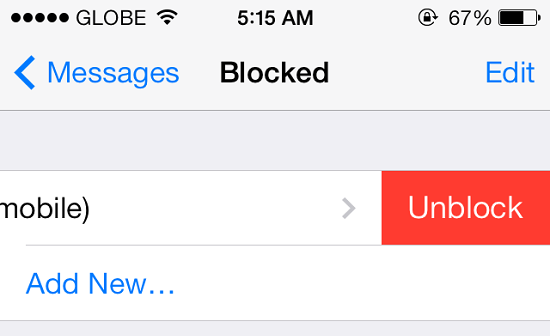
If you want to unblock a person, that is very easy just like blocking any number. You just need to go to Settings and select any of the Messages, Phone or Facetime option and scroll down to select Blocked option. Then you will be able to see the official blocked list. To unblock, simply swipe it to left on the name and a red button is going to appear.

iOS 7.1, build number 11D5099e, is available for registered iOS developers to download from Apple's Developer Center, with a full rollout likely before the end of 2013.
Cult of Mac has highlighed all of the main changes in Apple's iOS 7.1, and there's nothing included that is likely to change your life. However, there are some subtle tweaks that might be welcomed by iPhone and iPad users.
Among these updates is a new toggle for the "dark keyboard" in the accessibility settings, allowing users to permanantely switch to Apple's redesigned keyboard layout. iOS 7.1 also brings improved contrasts to the accessibility menu, a switch that darkens the entire interface, adding darker backgrounds to folders, and deepening the background on the dock.
A new high dynamic range (HDR) Auto mode is also included in the iOS 7.1 beta, a feature that automatically chooses the best photo from your HDR image, alongside the ability to save Burst Mode images to Photo Stream and a redesigned Flickr logo that matches the overall 'flat' look of iOS 7.
Notifications is the final aspect of the software to get a refresh in iOS 7.1, with Apple reportedly making it easier to clear notifications and updating the menu dialog.
Source: The Inquirer

The reason behind iOS 7 defaulting to minute increments for calendar appointments is beyond me. Have you ever scheduled a meeting for 8:03? I know I haven't.
In previous versions of iOS, the calendar would increment by 5 minutes, which makes a lot more sense. As it turns out, iOS 7 offers the same functionality, you just need to change a simple -- but hidden -- setting.
As WonderHowTo pointed out, a quick double-tap on the minute column when adding an appointment will change it from 1 to 5 minutes.
Sadly, the change doesn't remain in place; you'll have to change the increment again the next time you add an appointment to your calendar. But in the end, you can save some scrolling time with a quick double-tap.
Image : CNET
Source : CNET

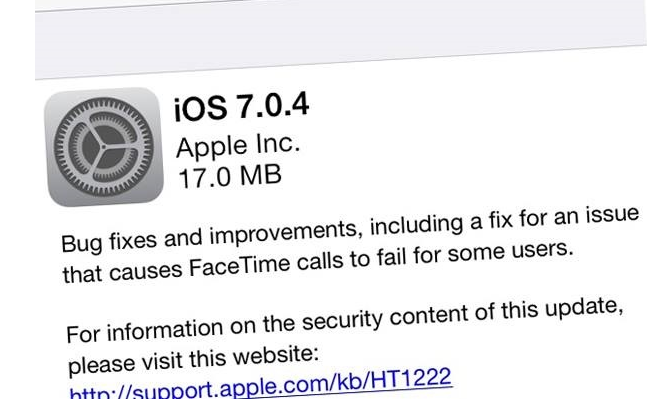
Apple iOS 7.0.4 update is now available for iPhone, iPad and iPod touch. The update bumped the iOS 7 to build 11B554a forgoingiOS 7.0.3.
The release, Apple explains in the official description of the update, brings various “bug fixes and improvements, including a fix for an issue that causes FaceTime calls to fail for some users.” The update – weighs 17MB only — is applicable to iPhone 4 or higher, iPad 2 or later, iPad Mini and iPod touch, and now available via OTA and can also be downloaded via iTunes.
Besides, it also addresses a security issue that lead to complete App and In-App purchases with insufficient authorization. Surprisingly, an iOS 5 bug that allows to restore deleted PNG alpha photos has reportedly returned to few iOS 7 upgraded devices.
The smartphones — especially the iPhone 5 and iPhone 4S — have now become perfect substitutes of compact cameras. And, it could be privacy threatening as iOS 7 doesn’t seem to untie from past and brings deleted PNG photos back into the Camera Roll. At least in the form of preview.
The glitch isn’t immediate and, fortunately, only the previews are restored instead of original-size images. To re-generate the bug, you must save one transparent background as PNG with Alpha channel into the Camera Roll. Once the file is saved, old shots would begin to resurface – thumbnails only – and it’s enough to bring up old memories and threaten privacy.
Apparently, the bug is related to an erroneous construction of previews for third-party apps, in the Photo folder. It allows any app to display thumbnails as the background film such as photo editing apps, games and so on, but it could be hazardous in case of theft.
Along with this, Apple has also rolled out 6.0.2 update for its Apple TV set-top box. It can be accessed through the device’s Settings, then General and lastly Software Update. The size of update is relatively small, however Wi-Fi is highly recommended to download the update.
Via: Inferse
Subscribe to:
Posts (Atom)


Recent Comments