
If you are running any current version of iOS 7, you’ll be able to take advantage of this tool. All you need to do is plug in, to your computer, disable your lock screen, run the program, and when all is said and done you’ll be jailbroken. Unfortunately the evasi0n team didn’t see fit to work with Saurik to include an updated version of Cydia or MobileSubstrate, but a quick glance at his twitter feed shows that the wait won’t be terribly long for those things.
 |
| Evasi0n Jailbreak for iOS7 |
This jailbreak from evasi0n includes something new for Chinese markets. Instead of Cydia, these users will have access to the all Chinese TaiG store. It is designed to offer services and apps that are more relevant in those parts of the world, much in the same way the CyanogenMod team intends to do soon with Tencent in the future. Some early poking around in this new store revealed some pirated apps, but the evasi0n team wrote a separate post explaining to everyone their plans for dealing with those apps moving forward.
If you’re all set to joilbreak, all of the tools are there for you to jump in and enjoy. If you’re more interested in waiting for Cydia to be updated and bugfixed, keep an eye on Saurik’s twitter account for more details.
via : Geek.com
 |
| iPhone 5C running iOS 7 |
The Evasi0n team announced Sunday morning it had released an untethered jailbreak for devices running iOS 7.0 through 7.0.4. The security bypass gives iPhone, iPod, and iPad owners deeper access to the software on their devices than Apple allows.
The jailbreak takes 5 minutes to install and works on both OS X and Windows-based machines, according to Evasi0n, which included step-by-step installation instructions. The bypass allows devices to be rebooted without connection to an external device.
Apple is, of course, expected to eventually fix the exploits Evasi0n is using to jailbreak the company's devices. The company has long recommended that users not jailbreak their device at the risk of security vulnerabilities, shortened battery life, unreliable voice and data, disruption of services, and the inability to apply future software updates.
Via : CNET
 |
| Google Play Music gets a new look for iOS 7 |
Source : iTunes
WhatsApp's CEO, Jan Koum in a blog post revealed the news and also noted that the company added 100 million active users in the last four months alone.
 |
The blog post said, "Our goal in creating WhatsApp was to empower people through technology and communication, no matter who they are, or where they live. WhatsApp has reached a milestone that no other mobile messaging service has achieved: 400 million monthly active users, with 100 million active users added in the last four months alone. This isn't a count of people who just registered for WhatsApp - it's the number of people who are actively using the service every single month."
The mobile focused messaging company told AllThingsD that WhatsApp wants to turn the discussions of the shared numbers by other mobile instant messaging services to be about active users and not registered users. AllThingsD quotes Koum, "We're a bit fed up and frustrated about people talking about registered users. We think it's important for us as a leader in the space to speak up and be ethical."
A recent report had suggested that some messaging apps have been using marketing muscle to compete with big names in instant messaging service. The report claimed that WeChat, a unit of Tencent, had budgeted up to $200 million for marketing overseas.
In November, Line messaging app claimed to have a user base of 300 million worldwide, out-of-which it added 100 million users in just four months. However, Line declined to reveal the number of active users currently using its services. AllThingsD cites Kik Interactive's figures of 100 million users, though notes that the company never detailed the number of active users.
The WhatsApp blog post also noted that the company currently has just 50 employees, and mainly include engineers. Further, it claimed to reach the 400 million mark without spending money on targeted ads or even marketing campaigns.
WhatsApp has been growing rapidly and has been a leader in the mobile instant messaging service. The popular mobile instant messaging service reached 300 million active user base in August and in no time has reached 400 million active users.
AllThingsD has shared some statistics of the WhatsApp service which include 16 billion messages per day; about 32 billion messages are received per day and some 500 million images are sent per day by users on WhatsApp.
Via : NDTV Gadgets

For years Facebook users have been asking for the ability to dislike a post on the social network. It only makes sense users would want to express disapproval for some of the posts they're subjected to. Up until now, Facebook hasn't provided an easy way to do this short of leaving a nasty comment.
Earlier this week, Facebook finally gave in and provided a method for users to show displeasure. But instead of providing a dislike button on status updates, Facebook has released a sticker pack for Facebook Messenger that includes a thumbs-down icon, as first reported byAllFacebook.
You can download the new sticker pack for free using the Facebook Messenger app on either an iPhone or Android device. Of course the sticker pack is also available through Messenger when chatting using the Web site.
In addition to the thumbs-down or "dislike" sticker, you'll find variations of the thumbs-up icon that's come to symbolize to a Facebook Like.
Source : CNET

Multi-Platform Updates
Viber
This week's update brings the ability to make VoIP phone calls to any phone number, landline or mobile, for an allegedly low rate (calls to other app users are free). The app also displays your phone number on caller ID, so your far-flung friends need not know you're calling them on the cheap, and the app is 100% free, no ads involved. [Android] [iOS]
Socl
Microsoft's try at social media (it's even pronounced "social" — get it?) has a new app for Android, iOS and naturally, Windows Phone. The search-based social network focuses on the visuals, letting you create collages and respond to others' images by making your own changes. Let's see where this one goes. [Android] [iOS] [Windows Phone]
Android
Convert Everything
This is one of those rare, pleasant apps that does just one thing, and does it exactly the way you'd want it to. Think of a parameter — seriously, any unit, be it shoe size or kinematic viscosity. Convert Everything will let you convert between standard units of measure with ease. The lite version is ad-supported, but if you work in a field where you've got to juggle standard and metric, this app will totally justify itself. [Free]
Cover (beta)
A smart lockscreen that promises to give you the right apps for whatever you're doing, Cover gives you quick app access based on the time of day and your location. It's also got a smooth single-swipe app switching function to make for quick navigation. [Free]
Android Device Manager
Android's formerly desktop-only device locator now has an accompanying phone and tablet app. Like the desktop version, the app shows you where your misplaced device is, and offers to blast its ringer, change the lockscreen password, or nuke it entirely. Now you can use your Android to find your other Android. [Free]
iOS
Peek
This brand-new app helps you find the best things to do in a bunch of major U.S. cities, London and Paris. Start by taking a quiz to determine your "travel persona", then browse activities by category, neighborhood, or date. Offline browsing even lets you figure out what you're going to do while you're in the subway. [Free]
Pandora Radio
The popular streaming music app's iOS 7 update brings fresh new design, and perhaps most importantly, the return of the alarm clock feature. Now you can wake up to a genre, not just a specific song like iOS's built-in alarm clock. [Free]
Fiverr
Fiverr, the anything-for-five-bucks freelance marketplace just rolled out this app that lets you hire yourself or someone else to do the things you need done. It's even got in-app direct messaging and push notifications to ensure you never miss out on a gig. [Free]
Windows Phone
MetroMail
Expand
Finally, a slick third-party Gmail client designed from the start for WP! MetroMail brings unbroken conversation threads, easy organization and plenty of options to search and archive old messages. [$1.50]
AccuWeather
Expand
Nice big update to this weather app this week, including adding Location Search and making the local forecast summary more prominent for quick appraisal of what you should wear. Finally, the app can now support unlimited locations, so you can swipe to see what the weather's like anywhere. [Free]
Expand
The ubiquitous professional social service now lets you add photos to your profile and monitor who's been checking you out. It also can pull contacts from your address book to help you boost your connections. Now get out there and start networking! [Free]
Via : Gizmodo

Apple has blocked the ability to update to iOS beta firmware without having your device registered on a developer account.
With previous builds of iOS 7, non-developers could install the betas as long as they chose 'UPDATE' instead of 'RESTORE' when installing the firmware.
Performing an update on an unregistered device will now install the firmware but will attempt to activate before loading for the first time. The following error is then presented...
Activation Error:
This device is not registered as part of the iPhone Developer Program. If you are a member of the iPhone Developer Program, please register your device in the iPhone Developer Program Portal at http://developer.apple.com/iphone.
Thus if you are not a developer, please don't try to update to beta 2. Also, since the betas expire, we recommend you restore to iOS 7.0.4.

Source : iClarified
The new channel leverages location information from your GPS, cellular, WiFi or iBeacon data and uses it as a "trigger" -- something that initiates an automated action. For example, you can instruct IFTTT to send a text message to your loved ones as you're arriving at your destination, or get an email when one of your Foursquare friends checks in somewhere near your apartment. If you use a Philips Hue, have it do a crazy light show to announce your upcoming arrival. There are plenty more ideas where those came from, but you'll have to go take a look at IFTTT's full listing of services and come up with a few clever recipes of your own as well.
Source: IFTTT
Via : Engadget

Angry Birds has earned developer Rovio enough money to make whatever games they want. But that hasn’t stopped the company continuing to mine the Angry Birds IP for new revenue streams, with the latest one being Angry Birds Go!–a racing game for iOS.
Angry Birds Go! isn’t officially released until December 11, but received a soft launch in New Zealand today which has revealed some pretty shocking pricing. You see, Angry Birds Go! is a freemium game, and aims to make its money from those dreaded recurring microtransactions.
The game is free-to-play, but as with most freemium titles most of the content is locked away until you start spending money, and limits are in place for certain features.
Source : Geek.com

24me
iOS; free
Often the challenge is not executing your to-do list, it’s creating the list in the first place.24me solves that problem by automating the process. With help from the Check.meservice, 24me integrates with hundreds of U.S. banks and thousands of utility and service providers such as Comcast and AT&T. By accessing your accounts, it will determine when your bills are due and populate your calendar with reminders.

Shifu
Android; free
The problem with to-do lists is that you have to remember to look at them and keep them updated. Shifu uses your location and phone usage patterns to proactively push reminders to your screen at the right moments.
You can set reminders based upon your Wi-Fi connection, location, who you’re talking with or how much time you have. For example, you can have Shifu remind you to download apps, movies, or music the next time you connect to your Wi-Fi network, or to pick up printer toner the next time it sees you’re at Best Buy.

Assistant
iOS, Android, and Windows Phone; free
Assistant stands out if you prefer using voice commands and responses. The app can brief you at the same time every day on upcoming calendar events, current news headlines, and even the weather.
Tell Assistant you want Mexican food or pizza, and it will summon Yelp listings according to your location. It’ll even read the names of the restaurants, tell you the star ratings, and let you know the distance from your location. Just tap a mute button when you’ve heard enough.

Sherpa
Android; free
“Ask and ye shall receive” pretty well describes Sherpa. You can tell Sherpa to send someone a text message or post to Facebook or Twitter. Ask it to update you on current events, and it pushes you to Google News. Enquire how a particular NFL team is doing and it will audibly share the final scores from the most recent game. You can have Sherpa notify you when your favorite teams score and when social media activities arise, such as Facebook friends’ birthdays and mentions on Twitter. It will also tell you when the weather is getting worse and let you know when you miss a call.

Mynd
iOS; free
Mynd is a context-aware calendar iOS app with a beautiful user interface. Using location awareness, it can automatically associate places with tasks or events. For example, if it detects your phone is always at the gym when your calendar says “spin class,” Mynd will add your gym location to all your spin-class dates.
How is this helpful? Transit time, for one thing. If it’s 4:30 p.m. and your spin class is at 5:30, but Mynd knows heavy traffic will extend your drive time to 35 minutes, it will calculate how much earlier you have to leave and adjust its alerts accordingly.

Source : PCWorld
Image : PCWorld

Just about a month ago, Microsoft rolled out Remote Desktop apps for iOS, Android and Mac OS X. On November 21, the company made available updates to all three versions.
What's in the updates? Here's Microsoft's list of features and fixes:Microsoft execs said that there've been 1.5 million downloads of the three new Remote Desktop apps combined in the past month. According to the Softies, the remote desktop app for Android is Microsoft's most popular Android app release to date. Execs said there have been more than 5,000 unique Android device types that have downloaded the app.
iOS
- Pinch to zoom support in mouse pointer mode
- Performance improvements
- iPhone 5 screen resolution fix
Android
- Pinch to zoom support in mouse pointer mode
- Performance improvements
- Improved support for stylus input
Mac OS X
- Improved full screen support for OS X 10.7 - 10.9
- Performance improvements
Download links for each of the three updates are available in Microsoft's Server & Cloud blog post.
Microsoft's multi-platform Remote Desktop apps -- which include an overhauled version of the two-year-old Mac Remote Desktop client -- provide access to virtual desktops. They allow users to connect from devices running these operating systems to Windows and Windows Servers to work with applications and files stored there. There are also versions of Remote Desktop for Windows and Windows RT. Microsoft execs have said there will be remote desktop support for Windows Phone, but no details as to when.
Remote Desktop has been one of the most popular Windows Store apps among Windows 8 and Windows RT users. The licensing requirements for these apps are complex. Client-access licenses and supporting back-end infrastructure are required to make Remote Desktop work on Windows and non-Windows devices.
Via: ZDNet

Blocking phone calls, numbers or messages is amount the standard feature in the modern Smartphone. Let us face the truth that there are many people from whom we just don't want to hear from.
So it is very baffling that the Cupertino company has not allowed blocking of text messages and calls into its brand new & completely redesigned Apple iOS 7 firmware.
iOS 7 Block Option & How to use it
So in the new iOS 7 you can easily block unrelenting exes, irritating friends, spammers, as well as telemarketers. Here is the method using which you can block iMessages, calls and texts in iOS 7.
iOS 7 Block Option & How to use it
So in the new iOS 7 you can easily block unrelenting exes, irritating friends, spammers, as well as telemarketers. Here is the method using which you can block iMessages, calls and texts in iOS 7.

The process is a lot similar to blocking calls on iOS. You just need to go to Settings and then Phone/Facetime and select Blocked option under it and start adding unwanted contacts in your block list. Again the block list is applicable to text messages, calls, iMessages as well as FaceTime calls. This means that even if you want to bock messages from a contact, you will also be blocking his calls too. At present there is no particular way to block only calls or messages.
How to Block Text Messages in iOS 7?

How to Block Unknown Numbers in iOS 7?

Now the question arises that what if you want to block a number that is not a contact saved on your phone. The process is also almost same. To block any number that you have recently came across, you need to go to Contacts and then select the recent option. There you are going to see an “I” symbol that is located on right next to contacts name. Tap the “I” symbol next to the contact whom you want to block and then scroll down and you are going to find “Block This Caller”. All you need to do is to select that and it is done.
To block any number who has just messaged you, you need to go to Message application, track down the contact, tap on the conversation, and you will see the contact button present on the top right corner. There you will see the same “I” button, tap on it, scroll down, and the select the Block This Caller option.
How to Unblock a Blocked Person in iOS 7?
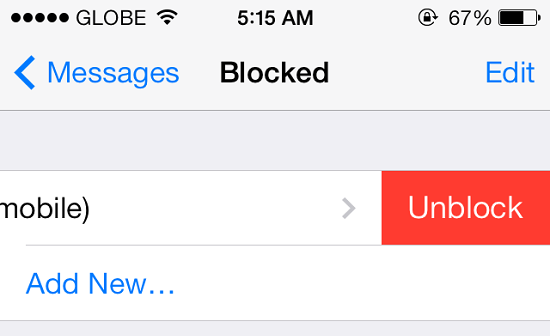
If you want to unblock a person, that is very easy just like blocking any number. You just need to go to Settings and select any of the Messages, Phone or Facetime option and scroll down to select Blocked option. Then you will be able to see the official blocked list. To unblock, simply swipe it to left on the name and a red button is going to appear.

iOS 7.1, build number 11D5099e, is available for registered iOS developers to download from Apple's Developer Center, with a full rollout likely before the end of 2013.
Cult of Mac has highlighed all of the main changes in Apple's iOS 7.1, and there's nothing included that is likely to change your life. However, there are some subtle tweaks that might be welcomed by iPhone and iPad users.
Among these updates is a new toggle for the "dark keyboard" in the accessibility settings, allowing users to permanantely switch to Apple's redesigned keyboard layout. iOS 7.1 also brings improved contrasts to the accessibility menu, a switch that darkens the entire interface, adding darker backgrounds to folders, and deepening the background on the dock.
A new high dynamic range (HDR) Auto mode is also included in the iOS 7.1 beta, a feature that automatically chooses the best photo from your HDR image, alongside the ability to save Burst Mode images to Photo Stream and a redesigned Flickr logo that matches the overall 'flat' look of iOS 7.
Notifications is the final aspect of the software to get a refresh in iOS 7.1, with Apple reportedly making it easier to clear notifications and updating the menu dialog.
Source: The Inquirer

Google may have said that its Google Play Music App for iOS would be released in a few weeks many months ago, but it appears the delay is finally over as it hits the App Store and features a 30 day free trial of the All Access service.
Google Play Music is Google’s answer to iTunes in the Cloud and allows a user to upload or match their purchases and own library against Google’s repository of music in the Play Store. This music can then be accessed on an Android device, and unlike iCloud, can be accessed via the browser, allowing a user to store up to 20,000 songs.
The service was then expanded to not only an upload/match replay service but to offer what was called All Access which was similar to what Spotify and Rdio offer whereby unlimited music can be listened to ad-free.
In addition to this, All Access features:
- Listen to unlimited songs
- Create custom radio stations from any song, artist or album
- Enjoy radio without skip limits
- Get smart recommendations based on your tastes
- Enjoy handcrafted playlists from our music experts
Google Play Music App for iOS
The good news for lovers of Google Play Music is that the service can now be accessed via your iPhone after Google released a dedicated iPhone App. The App can be loaded onto an iPad, but isn’t optimised for a bigger screen. The Google Play Music App for iOS is pretty much identical to that offered on Android, except I could find my auto-playlists such as Recently Added songs on the iOS counterpart.
All Access is available for $9.999 per month, but a free 30-day trial is available to test out the service. The standard upload and sync service which mimics the functionality of iTunes in the Cloud is free up to 20,000 songs.

The reason behind iOS 7 defaulting to minute increments for calendar appointments is beyond me. Have you ever scheduled a meeting for 8:03? I know I haven't.
In previous versions of iOS, the calendar would increment by 5 minutes, which makes a lot more sense. As it turns out, iOS 7 offers the same functionality, you just need to change a simple -- but hidden -- setting.
As WonderHowTo pointed out, a quick double-tap on the minute column when adding an appointment will change it from 1 to 5 minutes.
Sadly, the change doesn't remain in place; you'll have to change the increment again the next time you add an appointment to your calendar. But in the end, you can save some scrolling time with a quick double-tap.
Image : CNET
Source : CNET

Apple has released a minor update to software running on iPhone, iPad, and iPod touch devices.
iOS 7.0.4 includes bug fixes, security patches, and a slew of new features and software improvements.
The update also fixes a major problem for some, which caused FaceTime video calls to fail. iPods that are not able to upgrade to iOS 7 have their own version to upgrade to, iOS 6.1.5.
The new update improves iCloud Keychain, which was introduced in iOS 7.0.3, and the latest version of the desktop software, OS X Mavericks. The cloud-based technology keeps the Safari browser's passwords and credit card data in sync across all your Apple devices.
Secondly, in Spotlight, the device's internal search engine, Apple has brought back the ability to search Google and Wikipedia from the results. The two services were removed when iOS 7 was first released in mid-September.
Also on Thursday, Apple released a corresponding update to its Apple TV, updating the set-top box to version 6.0.2.The software update applies to the iPhone 4, iPhone 4S, iPhone 5, and the two new smartphones, the iPhone 5c and 5s. It's also available for the iPad 2, the third and fourth generation iPads, iPad Air, iPad mini, and iPad mini with Retina Display. Fourth and fifth generation iPod touch models also receive the update.
Users can update to the latest version by accessing the device's Settings, selecting General, then Software Update. In spite of the relatively small size of the update, it's recommended that users use Wi-Fi when updating.
Via: ZDNet

A hacking contest that makes sport out of serious security bugs paid $117,500 this week for exploits that compromised handheld devices powered by both Apple's iOS and Google's Android mobile operating systems.
The biggest of the three cash prizes was $50,000, paid to "Pinkie Pie," a pseudonymous hacker not yet past his 21st birthday, who already has collected at least two major bug bounties in the past 19 months. His previous hacks exploited vulnerabilities in Google's Chrome browser that gave him complete control of the underlying computer when it did nothing more than visit a booby-trapped website.
Like most modern browsers, Chrome is endowed with security mitigations designed to minimize the damage that can be done when hackers identify buffer overflows and other types of software bugs that are inevitable in just about all complex pieces of software. The security measures—which include "sandboxes" that contain Web content inside a carefully controlled perimeter—significantly increase the amount of work that attackers must put into developing working exploits. Also including address space layout randomization and data execution prevention, the mitigations require hackers to stitch together two or more attacks that exploit multiple vulnerabilities in the targeted device.
"The exploit took advantage of two vulnerabilities—an integer overflow that affects Chrome and another Chrome vulnerability that resulted in a full sandbox escape," Pwn2Own officials wrote about the Pinkie Pie hack. "The implications for this vulnerability are the possibility of remote code execution on the affected device."
A successful attack that fetched Pinkie Pie a $60,000 prize in early 2012 targeted at least six different security bugs to break out of the security sandbox fortifying the desktop version of Google's Chrome browser.
Separately, a hacking team from Mitsui Bussan Secure Directions in Japan won $40,000 for two exploits that compromised apps that are installed on all Samsung Galaxy S4 devices. After the S4 browsed a website under the group's control, they were able to access sensitive data stored on the device, including user contacts, bookmarks, browsing history, screenshots, and text messages. Officials with HP, which sponsors the Pwn2Own competition, didn't identify the specific apps that were targeted. The vulnerabilities have been privately reported to Samsung.
Source : Ars Technica

Unfortunately, there are still a number of big bugs that persist in iOS 7.0.4 including bugs that caused the wallpaper to change on the lockscreen, an issue where the Music app shows as a black screen when switching to landscape mode, a bug that causes a reboot when switching tasks via the Control Center, a screen freeze when trying to upload videos to YouTube through the Photos app, and more.
We're sure Apple is working on these bugs as well, but as yet there are no fixes.
Source: MacRumors ,MacRumors Forum
Subscribe to:
Posts (Atom)


Recent Comments