Shazam has updated its iPhone
app to tag songs, TV shows and more all on its own, no longer
requiring users to open the app and tap a button whenever they want to
tag something.
The feature, called Auto
Shazam, comes turned off by default, but users can turn it on by
switching a toggle once they've downloaded the latest update for the
app. Once turned on, Auto Shazam will remain on in the phone background
and listen for audio that it can tag while users go about their day
doing other things.
Any time the app tags a song or show with Auto Shazam, it will send users a notification with the name of the audio that it has tagged.
“Shazam is already known as fast and easy, but we want to become effortless,” Shazam Chief Product Officer Daniel Danker told The Times. “The only thing easier than pressing a button is not having to press one at all.”
Auto Shazam is set to turn off after users don't interact with the
app for two hours. This is built-in by Shazam so that the feature won't
drain users' iPhone battery. Shazam recommends using the feature at bars
and coffee shops where music constantly plays and also while watching
TV.
For those concerned about privacy, Shazam assures users that they have nothing to worry about. The app doesn't record audio, it creates digital fingerprints that are sent back to Shazam's servers and matched with fingerprints that are stored there. Those digital fingerprints cannot be converted back into audio, so even though the Shazam iPhone app is always listening and tagging, it is never recording.
Those digital fingerprints also ensure that the app won't run up users' data use. Rather than matching large recorded audio files, which would take up multiple megabytes of data, Shazam's digital fingerprints use less data than the size of an average email, the company said.
Auto Shazam has been available for the iPad for several months now, but this is the first time the company brings the feature to a smartphone. Shazam said it would like to bring the feature to Android, but the company said the Google mobile platform has limitations when it comes to the microphone.
Read more : http://www.latimes.com/business/technology/la-fi-tn-shazam-iphone-autoshazam-20131220,0,4616275.story#ixzz2o6dkMSrC
Any time the app tags a song or show with Auto Shazam, it will send users a notification with the name of the audio that it has tagged.
“Shazam is already known as fast and easy, but we want to become effortless,” Shazam Chief Product Officer Daniel Danker told The Times. “The only thing easier than pressing a button is not having to press one at all.”
 |
| Shazam |
For those concerned about privacy, Shazam assures users that they have nothing to worry about. The app doesn't record audio, it creates digital fingerprints that are sent back to Shazam's servers and matched with fingerprints that are stored there. Those digital fingerprints cannot be converted back into audio, so even though the Shazam iPhone app is always listening and tagging, it is never recording.
Those digital fingerprints also ensure that the app won't run up users' data use. Rather than matching large recorded audio files, which would take up multiple megabytes of data, Shazam's digital fingerprints use less data than the size of an average email, the company said.
Auto Shazam has been available for the iPad for several months now, but this is the first time the company brings the feature to a smartphone. Shazam said it would like to bring the feature to Android, but the company said the Google mobile platform has limitations when it comes to the microphone.
Read more : http://www.latimes.com/business/technology/la-fi-tn-shazam-iphone-autoshazam-20131220,0,4616275.story#ixzz2o6dkMSrC

We hope you weren't quick to leap on the Surface Pro 2 update that popped up last week; if you were, you may be regretting it for a while. The company haspulled the upgrade following reports of both failed installations and battery problems, including a reduced capacity and incomplete charges. A fixed release is coming "after the holidays," but there's no word of an easy way to roll back. Short of resetting the system or a convenient restore point, you may have to live with a buggy tablet for the next few weeks.
Via: Engadget
 |
| Apps Ops |
Source : Reuters, EFF
Via : Engadget
 |
| OS X Mavericks 10.9.1 |
This sort of internal release typically signals an imminent public release of the software, assuming the OS X development team does not find any mission critical bugs in final testing.
The update includes the following fixes:The first beta of 10.9.1 was seeded to developers back in mid-November following a public update specifically to address issues with Mavericks' Mail.app and Gmail.
- Improved support for Gmail in OS X Mail, and fixes for users with custom Gmail settings
- Improves the reliability of Smart Mailboxes and search in Mail
- Fixes an issue that prevented contact groups from working properly in Mail
- Resolves an issue that prevented VoiceOver from speaking sentences that contain emoji
- Updates Shared Links periodically when open in the Safari Sidebar
Source : Mac Rumors
 |
| UEFA League Updates On Android With HTC FootballFeed |
The interface of the app, which is basically based on HTC’s BlinkFeed homescreen design that was introduced in HTC Sense 5, is fully customizable so that you may easily follow only the teams and games you want. Match schedules can be sent to your calendar so you don’t miss out on anything, and can keep up with the scores even when you’re on the road.
The landing screen comprises of a user friendly design, letting you swipe leftward and rightward to navigate among Highlights, Stats and Gallery. Likewise scrolling up and down reveals more content within the current section.
While Highlights and Gallery are mostly about news and photos, Stats gives you more forensic data about current standings, clubs and matches etc. There’s also a Promotion section in the app that, although empty as of this writing, will offer exclusive promotions and competitions for anyone using the app in the future.
Other features include details on all upcoming matches in both tournaments, club pages with relevant facts and stats, and squad line-ups for each match.
CLICK to install from Play Store
 |
| SLIMDRIVER |
Step by Step process:
Step: 1
Step: 2
Now open the Slimdriver from windows start button and click on START SCAN the software will check the hardware components and it will search for the latest hardware drivers from the manufactures website
 |
| step 2 |
Step: 3
Now the SlimDriver will list the all available hardware updates according to the hardware category now click on download update corresponding to each driver update the Slimdriver will automatically download the update from the official site
it is preferred to create a restore point( a dialogue box will appear) and then reboot your system after installing hardware update.

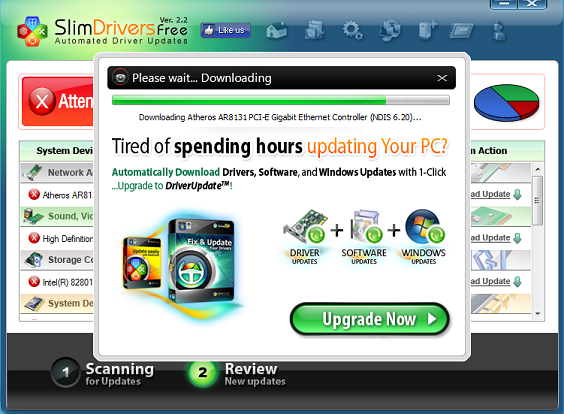
SlimDriver will be a very hand tool for those who use laptops ,where there is need to update WiFi,Bluetooth , Graphic , USB , webcams drivers it is the leading software tool under update category in CNET , Brothersoft , Softonic and many other sites .It is a free tool so our recommendation is to give it a try and see the result.

*We will be updating this post continuously as more information comes in. Last update: Nov - 26th - 2013.
It’s a tricky one as always with Android. Google claimed it has made huge optimizations to the platform and its core apps so even devices with 512MB of RAM (the overwhelming majority of Androids across the world are actually low-end devices with 512MB of RAM) can have a good, smooth Android experience.
The new Android 4.4 KitKat however still seems to be coming first and only to the top-shelf devices. Here is the list of phones we know will get the update. We have added a timeframe for that update. The information comes straight from the manufacturer, so it is official, not a rumor.
If you are wondering about a device that is not on the list, chances are the manufacturer either has not yet announced plans or the device will not get the KitKat update.
With no further ado, here is when Android 4.4 is coming to various devices:
It’s a tricky one as always with Android. Google claimed it has made huge optimizations to the platform and its core apps so even devices with 512MB of RAM (the overwhelming majority of Androids across the world are actually low-end devices with 512MB of RAM) can have a good, smooth Android experience.
The new Android 4.4 KitKat however still seems to be coming first and only to the top-shelf devices. Here is the list of phones we know will get the update. We have added a timeframe for that update. The information comes straight from the manufacturer, so it is official, not a rumor.
If you are wondering about a device that is not on the list, chances are the manufacturer either has not yet announced plans or the device will not get the KitKat update.
With no further ado, here is when Android 4.4 is coming to various devices:
HTC
- HTC One (including carrier models) – By end-January
- HTC One mini - Within 90 days
- HTC One max - Within 90 days
- HTC One Google Play Edition – rolling out now
- HTC Droid DNA - by end of Q1
- DROID Ultra
- DROID Maxx
- DROID Mini
- DROID RAZR M (including Dev Edition)
- DROID RAZR HD (including Dev Edition)
- DROID RAZR MAXX HD
- Atrix HD
- Electrify M
- Moto X - "weeks" after Nov 13th announcement (*Verizon Moto X - Update is now available)
- Moto G - will launch in the U.S. with Android 4.4 on board
- Nexus 4 – *Update is now available
- Nexus 7 – “Coming weeks”
- Nexus 10 – “Coming weeks”
- Galaxy S4 Google Play Edition – rolling out now
- Galaxy S4 - January 2014*
- Galaxy Note 3 - January 2014*
- Galaxy S III - March/April 2014*
- Galaxy Note II - March/April 2014* (*rumored info)
Sony
- Sony Xperia Z1 / Z Ultra - end of January / early February (*rumor)
- Sony Xperia Z, ZL, Tablet Z - no timeframe
- Sony Xperia SP - no timeframe
- Sony Xperia ZR, Xperia T, Xperia TX and Xperia V - investigating update possibility
Via: Phone Arena

With the KitKat update released for a few Nexus devices and a variant of the Moto X (but not the Nexus 4), it seems people have been checking for updates quite frequently. I know I have. It’s been so long, and my I/O Nexus 7 2012 is still on 4.3. But according to Dan Morrill, a Google employee working on Android, this won’t help whatsoever, and some strategies are actually bad.
When you hit the “Check now” button in your updates, it will check in with the server. If it is denied, it will make you wait until the next batch of updates is released. Mashing the button will do absolutely nothing, not until the next batch of updates rolls out. So if you’re obsessing calm down a little. I will.
There is also a trick for clearing the data on Google Service Framework. I’ve done this a few times (with no success), but apparently that isn’t something you should really try.
According to Dan, the updates are first sent out to 1 percent of devices. If it goes smoothly, it is sent to 25, 50, and 100 percent of users over what he says is “a week or two.” So if you’re waiting for that update, quit mashing that update button and regulate yourself to around once a day. Tell us what device you have and if it has received the official KitKat update!
Subscribe to:
Posts (Atom)


Recent Comments