.jpg) |
| Checking the health status of your battery |
To check your battery health you’ll want to open the app, click on the relevant battery item in the sidebar, and double-check that you’re faced with the Details tab. From there scan down until you come across ‘Energy when full‘ (your battery’s current max charge) and ‘Energy (design)‘ (the original maximum charge specified by the manufacturer).
Unless you’re using a brand-spanking new battery fresh out of its wrapper you will see a discrepancy between these two numbers. This is normal. The larger the gulf between the numbers the lower the charge your battery will be able to hold. If you scroll down further you’ll also find a percentage gleaned from the ratio of the above two numbers: the original capacity to the current capacity.
While there are no easy ways to restore a depleted charge capacity there are things you can do to extend the battery life you do have. Things like turning the screen brightness down a few notches, shutting off bluetooth, and closing applications when not in use will all help give small gains, as will reforming your charging habits.
Sadly, as we said at the outset, things will, in time, get to the point where you’re connected to a charger more than not. The only real solution in such situations is to bite the bullet and buy a new battery.
Via : OMG Ubuntu
Image Credit: Deepak365

Here's How:
- Troubleshoot the cause of the beep code, assuming you're lucky enough to hear one. A beep code will give you a very good idea of exactly where to look for the cause of your computer turning off.If you don't fix the problem that way, you can always return here and continue troubleshooting with the more generic information below.
- Verify that the power supply voltage switch is set correctly. If the input voltage for the power supplydoes not match the correct setting for your country, your computer may not stay powered on.Chances are your computer wouldn't power on at all if this switch is wrong but an incorrect power supply voltage might also cause your computer turn off by itself.
- Check for causes of electrical shorts inside your computer. This is very often the cause of the problem when the computer powers on for a second or two but then powers off completely.Important: It's very, very important that you spend the time necessary to inspect the inside of your computer for issues that can cause shorting. If you don't take the time to troubleshoot this possibility thoroughly you may end up missing a simple electrical short and instead performing costly hardware replacements later on for no good reason.
- Test your power supply. Just because your computer came on for a few moments doesn't mean that the power supply unit in your computer is working properly. In my experience, the power supply tends to cause more problems than any other piece of hardware and is very often the cause of a computer turning off by itself.
- Tip: If you do end up replacing the PSU, keep the computer plugged in for at least 5 minutes before you try powering it on. This gives time for the CMOSbattery to charge a little.
- Test the power button on the front of your computer's case. If the power button is shorting out or even just sticking to the case, it might be the reason your computer is turning off by itself.Replace the power button if it fails your testing or if you suspect it's not working properly.
- Reseat everything inside of your computer. Reseating will reestablish all of the connections inside your computer which may have wiggled loose over time.Try reseating the following and then see if your computer stays on:
- Reseat all internal data and power cables
- Reseat the memory modules
- Reseat any expansion cards
Note: Unplug and reattach your keyboard and mouse as well. There is little chance that either one is the cause of this problem but we shouldn't overlook them while we're reseating everything else. - Reseat the CPU only if you suspect that it might have come loose or might not have been installed properly.Note: I call this out separately only because the chance of a CPU coming loose is very slim and because installing one is a sensitive task. This isn't a big concern if you're careful so don't worry!
- Start your PC with essential hardware only. The purpose here is to remove as much hardware as possible while still maintaining your computer's ability to power on.
- If your computer turns on, and stays on, with essential hardware only, proceed to Step 9.
- If your computer continues to turn off by itself, proceed to Step 10.
Important: This troubleshooting step is easy enough for anyone to complete, takes no special tools, and could give a lot of very valuable information. This isn't a step to skip if, after all the steps above, your computer is still shutting off by itself. - Reinstall each piece of nonessential hardware, one component at a time, testing your computer after each installation.Since your PC powered on with only the essential hardware installed, those components are working properly. This means that one of the devices you removed is causing your computer to turn off by itself. By installing each device back into your computer and testing after each installation, you'll eventually find the hardware that caused your problem.Replace the faulty hardware once you've identified it. These Hardware Installation Videosmight come in handy as you're reinstalling your hardware.
- Test your PC using a Power On Self Test card. If your computer continues to power off by itself with nothing but essential PC hardware installed, a POST card will help identify which piece of remaining hardware is to blame.If you don't already own and are unwilling to purchase a POST card, skip to Step 11.
- Replace each piece of essential hardware in your computer with a "known good" identical or equivalent spare piece of hardware, one component at a time, to determine which piece of hardware is causing your computer to shut off automatically. Test after each hardware replacement to determine which device is faulty.Note: Most normal computer users don't have a collection of working spare computer parts at their disposals. My advice is to revisit Step 10. A POST card is not expensive and is a much more reasonable approach than stocking spare computer parts.
- Finally, if all else fails, you'll likely need to seek professional help from a computer repair service or from your computer manufacturer's technical support.Unfortunately, if you're without a POST card and also without spare parts to swap in and out, you're left not knowing which piece of your essential computer hardware is faulty. In these cases you have little option than to rely on individuals or companies that do have these resources.Note: See the last tip below for information on requesting more help.
Tips:
- Are you troubleshooting this issue on a computer that you've just built? If so, triple check your configuration! There is a significantly greater chance that your computer is turning off by itself due to a misconfiguration and not an actual hardware failure.
Via : about.com

Until this week, that is, when the new ASUS Transformer Book T100, running Windows 8.1, dislodged Samsung’s Chromebook from the top spot on that list.
What makes the T100 different from the previous crop of touch-enabled tablet/notebook hybrids? In a word, price. Those first-generation 2-in-1 devices were priced at a premium, typically in the $1000 range, which is too high for students and budget-conscious consumers to even consider.
The T100 is a full PC, with a 10.1-inch display that detaches from the keyboard to act as a tablet. It runs Windows 8.1 on a zippy new Atom Bay Trail Z3740 processor, has 64 GB of solid-state storage, and includes a copy of Office Home & Student 2013.
And its recommended retail price is $399, which means its street price is hovering around $350-380. That's close to the magic $300 number where PC sales are still growing.
Google has been promoting the Chromebook category heavily with TV ads and a marketing pitch that positions the devices as “a new type of computer with everything built in.” In the Laptops section at Walmart.com, traditionally the most budget-conscious of all online shopping destinations, the devices get prominent placement.
There are more new Windows 8.1 devices in the sub-$300 category as well, including 8-inch tablets like the Dell Venue 8 Pro and Lenovo Miix 2 and the upcoming Toshiba Envoy.
These prices and device sizes are reminiscent of those that propelled the netbook category to success, briefly, a few years back. The trouble with netbooks is that they were sluggish and ultimately unsatisfying. The new generation of hardware, combined with Windows 8.1, means that these new devices start up in seconds and zip along on basic tasks, making them capable of doing everything a Chromebook can do, without sacrificing compatibility with conventional Windows desktop apps. There's still a price premium, but the gap has narrowed dramatically.
Source : ZDNet

Unlike an arm or leg, though, your laptop isn’t physically attached to your body. And there are all too many ways that it can come to harm—or even disappear with someone who covets it as much as you do. Follow these tips for laptop security, and you won’t have to ask Santa to bring you a new one.
Keep it padded
Tossing a laptop into the average backpack, book bag—or worse, simply carrying it under your arm—is asking for trouble. Your delicate hardware needs a purpose-built enclosure to keep it safe.

Traveling is full of shoving bags into tight spots, jostling them about, and stuffing in just one more thing. Push a little too hard, and you may hear an investment-shattering crack. Get a laptop-specific carrying case with plenty of padding and protection. Separate compartments for accessories and power cables are a luxury that can keep your PC scratch and dent free.
To deter theft, buy a nondescript bag, without logos that advertise to potential thieves that there’s valuable merchandise inside.
Turn it off
It’s tough to pack a powerful computer into a tiny enclosure, and then keep its critical components running nice and cool. That’s what the numerous vents and fans that suck cool air in and push hot air are for. Now imagine the heat that can accumulate in the secure, padded, tight quarters of a fancy new laptop bag.
Don’t make the mistake of cramming a sleeping computer into the confines of a backpack or messenger bag. Hibernating is not the same as being powered off. Heat is a computer's enemy number one. It can shorten your computer’s useful life, loosen components in the motherboard, or entirely destroy it. Block the computer’s vents for long stretches, and you could unpack a fried PC at the end of your trip. Be safe and power down that laptop before you stow it.
Keep an eye on it, but keep it out of sight
Laptops are hot-ticket items for thieves. Keep yours on your lap or within view while you're at the airport, bus, or train terminal. Don’t leave it an open target by setting it on an adjacent seat and then becoming distracted by your phone or your kids. If it disappears, don’t expect it to show up at the lost and found.
When traveling by car, keep your laptop hidden. Leaving it exposed on the passenger seat, even when getting out to pump gas, could be the perfect opportunity for a sticky-fingered individual to reach in and scoop up the loot. Keep it in the trunk, under the seat, or cover it with a jacket. And keep your car locked at all times.

Back it up and lock it down
What could be worse than losing your laptop? Losing the information you have stored on it. Follow a backup regimen, keeping a copy of your important data on a hard drive at the home or office or in the cloud, so you can pick up where you left off as soon as you can afford to replace the missing PC.

The Darter Ultra Thin features a 14.1-inch HD multitouch display that works out of the box with Ubuntu. It’s housed in a slender 0.9″ thick chassis weighing in at 4.60 lbs (around 2 kg). Battery life is estimated at around 5 hours – which, for Linux and its power management issues, is actually quite impressive!
Alongside the touchscreen the laptop also offers more traditional methods of input, namely a multi-touch trackpad and chiclet-style keyboard.
Pricing starts at $899 for the base model specification. This gets you:
- Intel i5-4200U @ 1.5Ghz (Dual core)
- 4GB DDR3 RAM
- Intel HD 4400 Graphics
- 500 GB 5400 RPM HDD
- Integrated WiFi & Bluetooth
- 1MP Webcam
- Intel Core i5 & i7 CPUs
- Up to 16GB DDR3 RAM
- Dual-storage, including SSD + HDD combo
- HDMI out
- Ethernet
- 2 x USB 3.0
- Separate Headphone & Mic Jacks
- SD Card Reader

Target tried to stand out with a $100 gift card offer with the purchase of the new iPad Air during Black Friday, but Walmart has chosen to focus on the first-generation iPad mini. Like Target, it is offering a store gift card when you buy a iPad mini (not the new Retina-display one, however), but Walmart is providing a $100 gift card instead of the $75 one Target is giving. The bad news is that Walmart is only makng this deal available at 6 p.m. on Thanksgiving for one hour with a guarantee that buyers will receive the product. (If the store runs out of stock, Walmart says impacted customers will receive their item "before Christmas.")
The same holds for the "one-hour guarantee" laptop special Walmart is rolling out at 6 p.m. on Thanksgiving: an HP Pavilion TouchSmart 14-B109WM for $278. This appears to be the version the retailer is currently selling for $398, and includes an Intel Celeron B877 processor, 4GB of RAM, 500GB hard drive, and 14-inch touchscreen. You can spend even less on the HP 2000-2d09WM notebook, which has a bigger screen (15.6-inch) -- though without touchscreen capabilities -- and an AMD E-300 processor, but only will cost $178 (or $140 less than the regular price).
Rounding out Walmart's Black Friday laptop specials, the HP Pavilion 15-B129WM is available for $388, or $60 off the current price. It features a 15.6-inch touchscreen, AMD A6-4455M processor, 4GB of RAM, and 500GB hard drive. Only one desktop sale is listed in Walmart's ad: The HP 20-B323W all-in-one PC, which comes with an AMD E1-1500 processor, 4GB of RAM, 500GB hard drive, and wireless keyboard and mouse, but lacks touchscreen functionality. It will sell for $348, or $101 off its current $449 price.
In addition to the usual ultra-cheap Android tablet deals the company likes to trot out at turkey time (for example, a $49 7-inch RCA slate at the 8 p.m. Thanksgiving one-hour guarantee event), Walmart has a couple of other notable tablets specials. Starting at an undisclosed time on Thanksgiving morning, you'll be able to purchase an iPad 2 with a Bluetooth speaker and accessory kit for $349 through Walmart.com. And like OfficeMax, Walmart will be offering the Samsung Galaxy Tab 3 10.1-inch tablet for $299, or $60 less than Samsung is presently selling it for on its own site.
After witnessing year after year of mob scenes when the doors to its locations have opened for Black Friday shopping, Walmart has finally wised up and decided to give out wristbands in advance of its one-hour guarantee events and for certain hot items (like the new Microsoft Xbox One and Sony PlayStation 4 video game consoles). Is that modicum of sanity enough to get you to venture out to Walmart on Thanksgiving or Black Friday for some of these deals? Let us know in the Talkback section below.
Via: ZDNet

Dell has started selling a thin and light touchscreen laptop called the XPS 13 Developer Edition, which will have Ubuntu Linux OS and Intel’s fourth-generation Core processors, code-named Haswell.
The laptop, code-named Sputnik, has a 13.3-inch touchscreen and will run on Ubuntu 12.04 OS. It is priced starting at $1,250 and is available in the U.S.
With the Linux OS, the laptop is different from other Haswell-based laptops that largely come with the Windows OS. Dell introduced its first Sputnik laptop a year ago as part of an experiment to bring Linux to ultrabook-style laptops.
While the price may be high for a Linux laptop, it has a full high-definition touchscreen and components typically found in high-priced laptops. The cheapest configuration has a Core i5 dual-core processor and 128GB of solid-state drive storage, while a $1,549.99 configuration has 8GB of memory and a 256GB SSD. Other features include the latest 802.11ac Wi-Fi and Bluetooth 4.0.
The Linux drivers have been optimized for components in the laptops.
The laptop will be available in Canada next week, and in European countries in December.
Dell has also started testing Ubuntu on the Precision M3800, which is the “big brother” to the XPS 13 Developer Edition, said Barton George, director of cloud developer programs at Dell, in a blog entry.
Source : PCWorld

Source : Engadget

Sam Burd, Dell's vice president of personal computer group, said at the event: "The most powerful XPS laptop we have ever shipped."
Burd also noted the "strong" partnership the company has seen with Intel, which powers all of Dell's latest devices. With that, Dell confirmed it will not refresh its current range of Windows RT products, which run rival ARM-based chips.
"We're expanding our tablet range on the full Windows product," Hand confirmed.
The Round Rock, Texas-based company also announced XPS 11, 12, and 13 ultrabooks.
The 13-inch XPS 13 ultrabook includes a high definition touch display, and lands with a Intel Core (fourth-generation) processor. The XPS 11 and XPS 12are "two-in-one" devices, in 11-inch and 12-inch versions respectively, and converge the traditional laptop and the tablet space with snap-in keyboards.
The two new ultrabooks also come with dual USB 3.0 ports, an HDMI port on the side, and a full-sized SD card slot.
Dell's new Venue 7 and Venue 8 are 7-inch and 8-inch tablets, respectively, designed to target the bring-your-own-device (BYOD) market. The Venue 7 runs Android Jelly Bean, comes with and comes with 2GB processing power, a high-definition display and 4G LTE connectivity; while the Venue 8 lands with Windows 8.1 and full-stylus capability.
"We want to make it really affordable. It's not just about value, but also longevity that comes from the device," according to Neil Hand, Dell's vice president of tablet and performance PC group, who spoke at the event.
Dell's own Pocket Cloud is bundled in with the new products. It allows users to access data in the cloud, and versions that allow applications to be run on the fly, such as Photoshop on an Android tablet, Dell executives said.
Meanwhile, the Windows-powered Venue Pro 11 comes in a similar frame to Microsoft's own branded tablet, and includes a snap-in keyboard dock to transform the device into a laptop factor. The device lands with a Intel Bay Trail processor, and a 1,920 x 1,080 resolution display.
With a 10-inch display, it also has a detachable battery allowing enterprise users to snap in a new power source at will. The part-tablet, part-laptop boasts up to 17 hours of battery life, according to executives.
There's another version of the tablet for businesses, as well as government agencies or financial and healthcare industries. But Dell says the features are just as applicable to the ordinary business user.
The smaller 8-inch Venue 8 Pro tablet comes with Windows 8.1, 2GB of RAM, a full-size SD card slot for additional storage, and micro-USB charging. It's one-third of an inch thick, and weighs less than one pound.
Source : ZDNet

QUESTION I have recently upgraded my PC's memory by adding an additional two sticks of memory of the same type as the two which were installed when I bought it. Unfortunately, my PC has started crashing a fair bit with the new memory installed.
I have tried re-seating the memory and using different sticks in different memory slots, but I can't make my system run reliably and I'm now not sure which sticks of memory are the new ones.
Is there a reliable way I can test my system to find out where the fault lies?
HELPROOM ANSWER If you have a spare USB flash drive or a blank CD and plenty of time, you can perform a thorough test of your memory using Memtest86+ from www.memtest.org.
This utility needs to boot from a DOS environment (hence the USB flash drive) and offers a simple menu-driven interface which will allow you to stress-test your RAM.
Follow the Download link at memtest.org and download either the Auto-installer for USB Key or the Pre-Compiled Bootable ISO, depending on which medium you're intending to use to boot your system.
To make a bootable CD from the .ISO file, use your favourite disc burning software. We've found Imgburn from www.imgburn.com to work well.
If you want to make a bootable USB key, you'll need to unpack the auto-installer download and run the utility, selecting your blank USB flash drive. Note that all existing data on the drive will be erased while preparing it for use with Memtest86+.
Now boot up your PC using the disc you just created. The Memtest86+ software should load up and start running automatically. Now you just wait. The testing process will probably take a few hours, depending on how much RAM you have installed, so you may want to leave it running overnight.
Near the top of the screen, in the middle, it will display Test #x, where x is the number of the test currently running. It's generally advised to leave the program running until this gets to around No.8.
If no errors are detected, the problem is probably unrelated to your memory chips. If errors are reported then you may have one or more faulty sticks of memory or possibly one or more faulty memory slots on your motherboard.
You will have to locate the source of the problem by a process of elimination. At this point it would be a good idea to mark your memory sticks in some way so they don't get mixed up again.
Start with the first memory slot and re-test each stick of memory in that slot one at a time, until you find one with errors. If more than one stick reports errors, try testing in a different memory slot.
Also check the specification of your memory modules and ensure that your PCs BIOS is configured correctly for your memory. It's wise to use matched memory sticks – i.e. those that all have exactly the same specifications and timings.
Source : PC Advisor
Dell today introduced its new line of tower and mobile Precision professional workstations. Some of the highlights are 4th-generation Intel Core processors, Intel Xeon E5 processors, professional AMD and Nvidia graphics, various SSD options including PCIe SSD, and a mobile screen with a screen resolution higher than the Apple MacBook Pro's Retina display.
The desktop Dell Precision lineup includes new tower desktops with the Precision T3610, T5610, and T7610.
The Precision T3610 is the mid-level, single-socket workstation with options for up to two entry- and mid-level 3D AMD FirePro and Nvidia Quadro graphics, as well as Professional grade 2D graphics cards.
The Precision T5610 is the next level up, with single- and dual-socket options, and two PCIe x16 (Gen2 and G3) with options for 2D and 3D graphics cards up to Nvidia Quadro K5000. Both the T3610 and T5610 can be equipped with three 3.5-inch hard drives or up to four 2.5-inch drives.
The top dog is the Precision T7610, which has plenty of space inside the tower chassis for two Intel Xeon E5-2600 v2 processors, up to three graphics cards (up to two Nvidia Quadro K6000s cards), and either four 3.5-inch hard drives or up to eight 2.5-inch drives. All three desktop workstations can accommodate a selection of 7,200rpm SATA drives, 10,000rpm SATA drives, 10k and 15k SAS drives, SATA SSDs, and PCIe SSDs. T5610 and T7610 can be equipped with Nvidia Tesla K20C CGPU co-processor cards, with a Intel Xeon Phi 3120a co-processor card available in the T7610.
The T3610 starts at $1,099, T5610 at $2,759, and the T7610 at $3,059. All three will be available on Sept. 12.

On the mobile side, the Dell Precision M4800 is a 15.6-inch portable workstation with options for 1,366-by-768, 1,920-by-1,080 (full HD), and 3,200-by-1,800 (QHD+) resolution panels. As Dell pointed out, this is a higher resolution than the Apple MacBook Pro with Retina display (2,880-by 1,800 resolution). The M4800 has space for up to three storage devices, including self-encrypting hard drives, hybrid hard drives with spinning storage and integrated SSDs, SATA SSDs (up to 512GB), and mini-Card SSDs up to 512GB. The M4800 can be configured with RAID 0, 1, and 5.
The larger 17-inch Precision M6800 can be equipped with a 1,600-by-900 screen or one of two 1,920-by-1,080 (full HD) screens. One full HD screen features 10-point touch with a Wacom digitizer for graphics arts and for use with Windows 8. The larger M6800 can be equipped with up to four storage devices and RAID 0/1/5. Both mobile systems have the option of a variety of 4th-generation Intel Core processors up to Intel Core i7 Extreme Edition, AMD FirePro and Nvidia Quadro graphics, and both can work with Dell's WiGig wireless docking solution.
The Precision M4800 starts at $1,249 and the M6800 goes for $1,599 starting on Sept. 12 as well.

Source : PCMag
Samsung's Ativ Book 9 Lite was launched in the UK in August, and is the less powerful but more portable model in the Ativ Book series. Running Microsoft's Windows 8 operating system (OS), the Ativ Book 9 Lite has a solid-state drive (SSD) for quick boot times and a touchscreen for those rare times when you actually want to use the Windows Metro user interface.

Measuring just over 17mm thick, we test to see if Samsung's Ativ Book 9 can prove a worthy contender for those in the market for a Windows 8-powered Macbook Air equivalent.
Design and build
The Ativ Book 9 Lite's appearance follows in Samsung's usual hardware design footsteps, arriving in two main colours, a blue-black or white. Our review model was the blue-black edition, which we feel looks a little more stylish and would probably show fewer marks and stains after long-term use.
The Ativ Book 9 Lite's appearance follows in Samsung's usual hardware design footsteps, arriving in two main colours, a blue-black or white. Our review model was the blue-black edition, which we feel looks a little more stylish and would probably show fewer marks and stains after long-term use.

The Ativ Book 9 Lite's entirely plastic construction means it does look and feel rather cheap, but it's also very light for a Windows 8 device, weighing 1.58kg. It's skinny, measuring just 17.4mm thick, making it a brilliant device for travelling with and using in both the home and the office, for example.
The Samsung Ativ Book 9 Lite's chassis is very smooth in hand, which lends to its overall slimline and elegant design. Despite its super-slim form, build quality is a strong point for the Ativ, too. Both the keyboard and the screen feel robust and sturdy, despite their plastic construction. We tested this by taking the screen and forcing it in opposite directions: we found there was little flexibility.

Another nice feature is that the Ativ Book 9 Lite's hinge allows the screen to be pushed all the way back so that it lays flat to the keyboard, making screen-sharing much easier if, for example, you are playing a two-player touch-enabled game with a friend.
Source : V3

Asus continues to break new ground in computer form factors, announcing a number of new PC products at the IFA show in Berlin today. The company demonstrated two new additions to its Windows Transformer line of convertible tablets, two glass-enveloped Ultrabooks, and what must be an extremely inexpensive ultraportable laptop. Asus also showed off a new Android-powered Transformer with a 2560-by-1600-pixel display.
Transformer Book T300
The new Transformer Book T300 is an Intel Haswell-powered ultraportable laptop with a detachable 13.3-inch display that can also function as a stand-alone tablet. Asus will offer models based on Intel’s fourth-generation Core i3, Core i5, and Core i7 CPUs (from the Haswell family), with up to 8GB of DDR3 memory and SSD storage up to 256GB.
The IPS display supports 10-point multi-touch and delivers resolution of 1920 by 1080 pixels. The tablet is equipped with a front-facing 720p camera, a rear-facing 1080p camera, one USB 3.0 port, and a micro-HDMI output. It measures 0.45 inches thick and weighs less than 2.5 pounds.
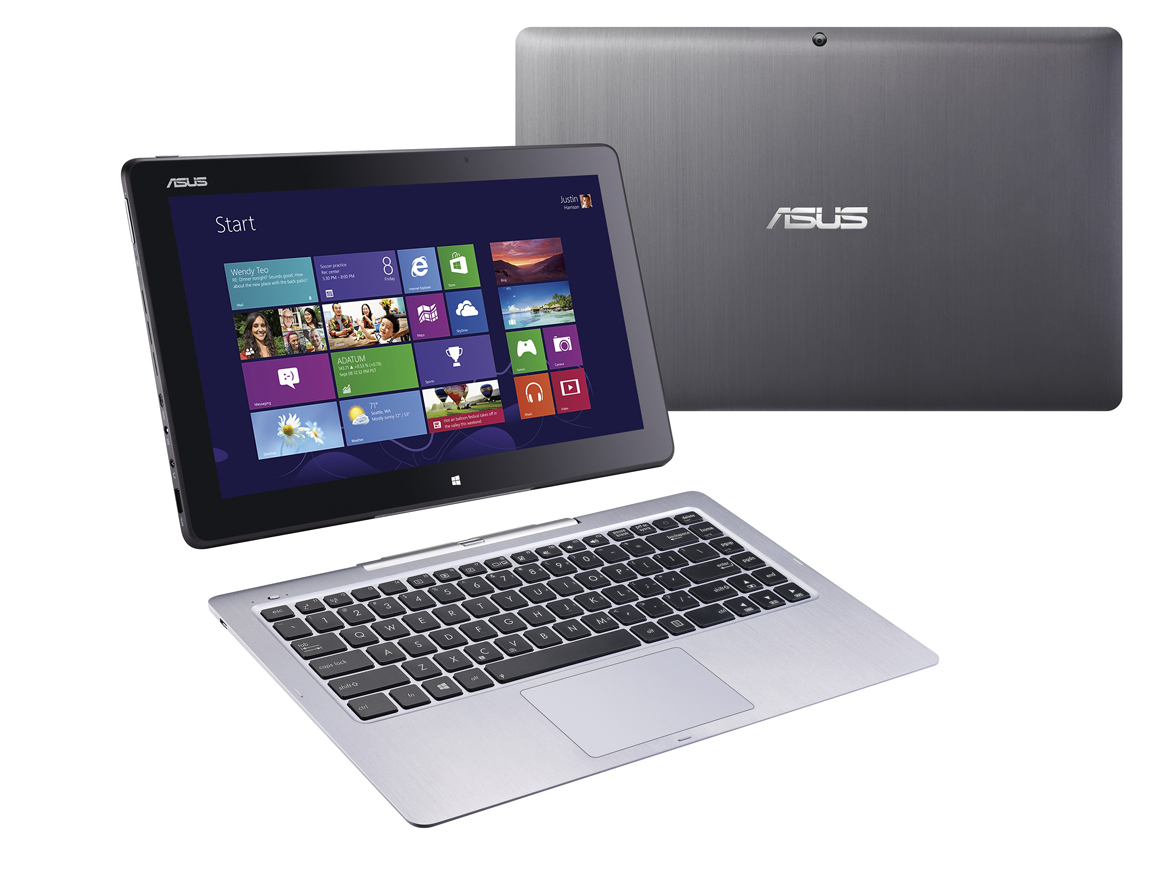
The dock has a full-sized backlit keyboard, a multi-touch touchpad with Windows 8 gesture support, and a micro-USB 3.0 port. It also less than half-an-inch thick, weighs slightly more than 1.5 pounds, and attaches to the display via magnetic contact points for storage (much like the smaller Sony VAIO Tap 11 Sony announced earlier today. Asus promises the system will deliver eight hours of battery life.
Transformer Book Trio
The Transformer Book Trio gets its name from its three-way functionality: One person can use this convertible as a Windows laptop, or you can detach the 11.6-inch display and let someone else use it as an Android tablet while you plug the backlit keyboard dock into a stand-alone display and use it as a Windows desktop PC. The base station is outfitted with both mini DisplayPort and micro-HDMI 1.4, and both units have stereo speakers onboard.
The base station is powered by a Haswell processor (up to a Core i7), 4GB of DDR3/1600 memory, and up to a 1TB hard drive. The detachable IPS touchscreen display (with resolution of 1920 by 1080 pixels) has an independent Intel Atom Z2760 processor, 2GB of DDR2/1066 memory, and up to 64GB of flash storage.

Data stored on the tablet can be accessed by either component. Both units have Bluetooth and wireless network adapters, so each can connect to the Internet independently: There’s a dual-band 802.11ac adapter in the base, and a 2.4GHz 802.11n adapter in the display.
Asus claims the paired units will deliver up to five hours of battery life when operating in Windows mode, and up to 13 hours when operating in Android mode.
Zenbook UX301 and UX302
Asus announced two new 13.3-inch Zenbook Ultrabooks, both of which will be powered by Intel’s fourth-generation Core processors (aka Haswell). These new notebooks feature lids encased in Corning’s scratch-resistant Gorilla Glass 3.
Both Zenbooks will be available with either Core i5 or Core i7 processors. The 3.04-pound Zenbook UX301 will feature Intel’s HD Graphics 5100 (aka Iris Graphics 5100) and deliver resolution of 2560 by 1440 pixels. It will be available with either 4- or 8GB of DDR3/1600 memory and up to 512GB of SSD storage—in RAID 0, no less.
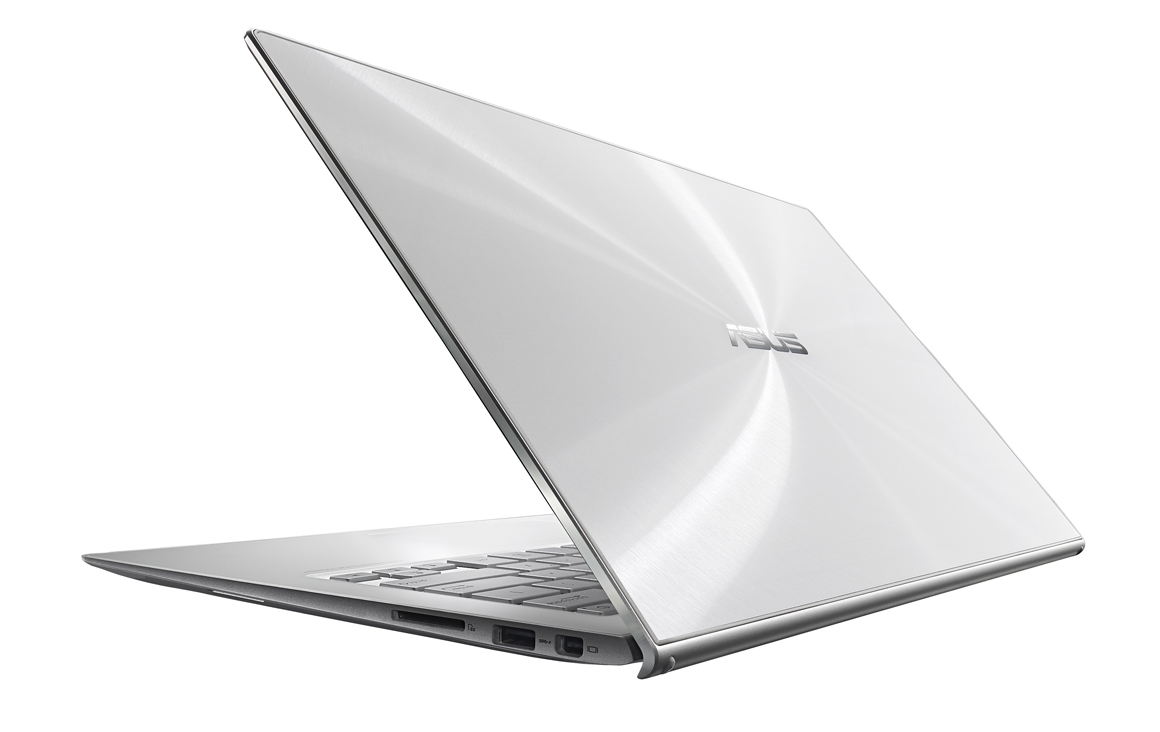
The Zenbook UX302 will come with 4GB of DDR3/1600 memory and will be outfitted with a discrete GPU in the form of Nvidia’s GeForce GT 730M with 2GB of video memory. It will deliver resolution of 1920 by 1080 pixels. The UX302 will be outfitted with up to a 750GB mechanical hard drive, supplemented by a 16GB SSD cache. It will weigh 3.3 pounds.
Both Zenbooks will feature backlit keyboards, Bluetooth 4.0, dual-band 802.11ac Wi-Fi adapters, Mini DisplayPort and HDMI 1.4 video outputs, and SD card readers.
X102BA ultraportable laptop
Those with less exotic budgets might be interested in hearing about Asus’s new X102BA ultraportable, a 10.1-inch multi-point touchscreen notebook powered by an AMD A4-1200 processor (from AMD’s Temash family of APUs).
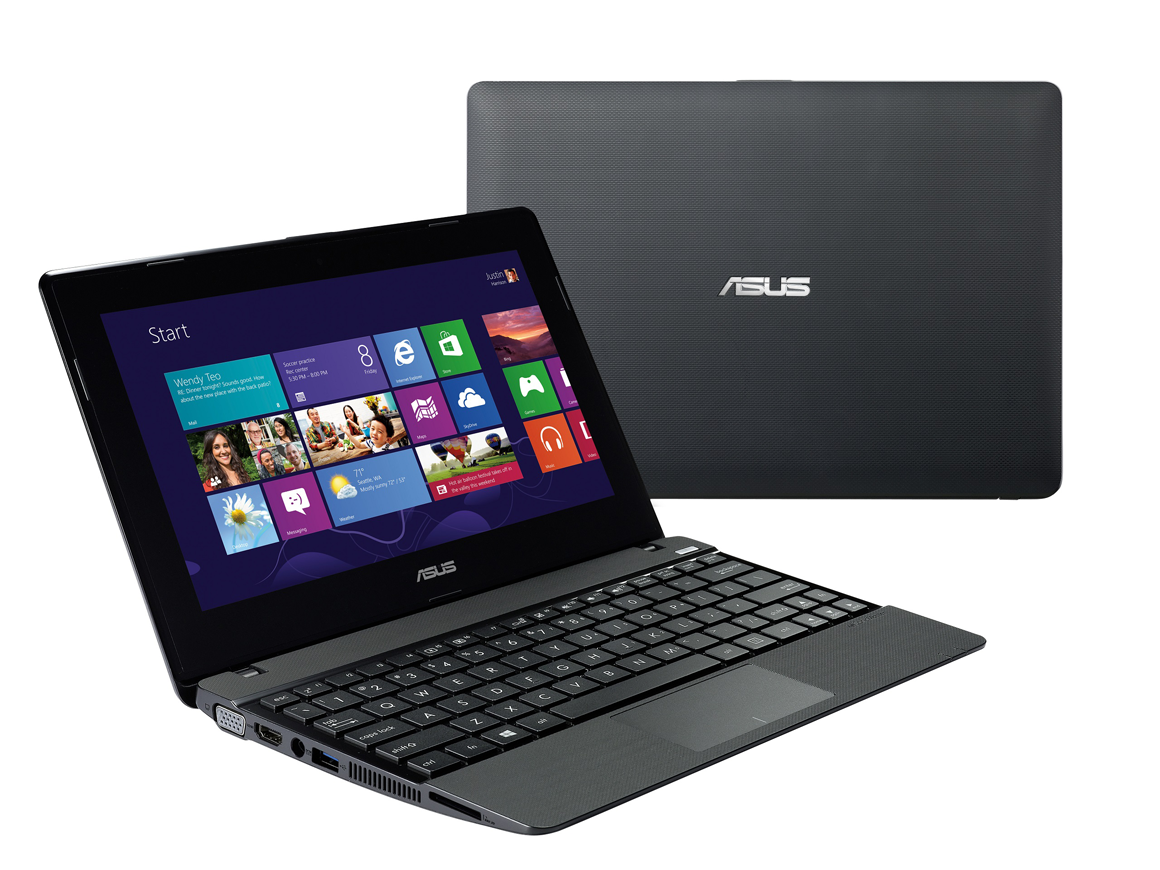
While Asus did not release pricing for any of these new machines, the specs for the X102BA have “low-cost” written all over them. Video resolution from the integrated AMD Radeon HD 8180 GPU is limited to resolution of 1366 by 768 pixels, for instance, and the base model will come with just 2GB of DDR3 memory and a 320GB mechanical hard drive (4GB of memory and a 500GB drive are available as options).
The X102BA will come with an integrated 720p webcam, USB 3.0 ports, Bluetooth 4.0, and an 802.11n Wi-Fi adapter. And Asus is also bundling the full version of Microsoft’s Office Home & Student 2013.
Source : PCWorld

Lenovo is rolling out a new armada of ThinkPads as it aims to put the lineup on a diet and bridge consumer features with corporate must haves. Even the workhorse ThinkPad T-series is trying to cut down to ultrabook weights.

The No. 1 PC company's ThinkPad strategy plays well with its enterprise base and tries to capitalize on what analysts call a mini corporate PC refresh cycle. Indeed, Windows XP support ends in April 2014 and companies are evaluating Windows 8 vs. Windows 7 in new machines. Most enterprises will have a mix of both.
Speaking on a conference call, Matt Bereda, marketing director of Lenovo's Think Business Group, said the company is still focused on reliability and ease of deployment, but wants to add features that are unique. Lenovo has dabbled with enterprise multimode PCs with the ThinkPad Helix and Twist, but has largely stayed with a script that has worked for 20 years.
The latest batch of ThinkPads, which feature the latest Intel chips, includes the following:
T440s and T440: The T Series will now have touch enabled displays, solid state drives and can cut down to 3.5 pounds with the T440s in a 21mm think frame. The T-440 will weigh about 4 pounds. A T430 today can push 4.77 pounds, according to Lenovo's Web site. The main addition with the enterprise ThinkPads are hot swappable batteries. Lenovo has added "power bridge" technology that allows a user to change batteries without powering down.
The T440s is available at the end of October starting at $1,149. The T440 is available at the end of September with a starting price of $899.
X240: Lenovo's corporate ultraportable play weighs in at less than three pounds and is 20 mm thick. A touch screen is an option and the X240 doesn't require various dongles---a plus for the road warrior. The X240 is available at the end of October starting at $1,099.
ThinkPad S Series, which is designed for small businesses. The SS440 and S540 have touch displays and add thin bezels and what Lenovo calls a "floating design." U.S. availability is unclear.

For good measure, Lenovo also rolled out a 21:9 panoramic ThinkVision monitor. The 2560x1080 display with HD Webcam is designed to be used with collaboration applications and multitasking. The display starts at $799 with October availability.
source ZDNet
Subscribe to:
Posts (Atom)


.jpg)
Recent Comments