 |
| AMD Catalyst 13.12 |
AMD has made available updated drivers for Windows and Linux. It's fair to say there have been a decent number of changes and improvements since the last WHQL (Windows Hardware Quality Labs) approved drivers to come out of AMD in September, so let's have a look...
The Catalyst 13.12 WHQL for Windows and Linux drivers are "basically... the WHQL version of the 13.11 Beta V9.5 drivers," according to AMD's @CatalystCreator. So if you have those installed you're good to go already.
As you would expect, the new drivers offer support for AMD's latest range of graphics cards including the AMD Radeon R9 290, 280, and 270 Series and AMD Radeon R7 260, 250, and 240 Series. Some of the most important improvements you might see with this driver set is the AMD CrossFire frame pacing tech. This should even out framerates in your CrossFire setup to ensure smoother gameplay. Frame pacing is set globally in the Catalyst Control Centre or on a per application basis.
In related improvements for CrossFire configuration owners the following games have improved CrossFire performance scaling; Call of Duty: Ghosts (multiplayer component), Splinter Cell Blacklist, Saints Row 4 and Metro Last Light.
AMD informs us that there are new Enduro profiles for several new AAA games including; XCOM: Enemy Unknown, Need for Speed Rivals, Total War: Rome 2, Battlefield 4, Saints Row 4, Splinter Cell Blacklist and FIFA 14. Enduro technology is especially relevant to users of laptops with built in AMD GPUs as it "is designed to unlock the full potential of your laptop’s performance while maximizing battery life".
AMD Catalyst 13.12 driver for Linux
Linux users also have a new AMD Catalyst 13.12 driver. According to AMD this driver fixes the following issues:
- Ultra slow dota2 fps
- System hang when startx after enable Eyefinity
- System hang when run Unigine Heaven 4.0
- Fix the procfs permission issue on kernel 3.10 and later
- System hang when run some OpenGL stress test
- Glxtest failed with force AA
- Fail to launch cairo-dock
- AC/DC switching is broken
- Tear-Free Desktop sets V-Sync to 30Hz instead of 60Hz
- Steam crashes and games hang on a black screen when Force AA is on
- Glxtest failed on SLED11 SP3
- Display corruption when using rotation
Source : Hexus.net
 Advanced Micro Devices will ship its next-generation Kaveri architecture by January, executives said Monday evening.Specifically, desktop availability will take place on January 14, executives said at AMD’s APU13 conferences on Monday. Chips for notebooks, servers, and embedded systems will follow later in the year, executives said.AMD executives also announced the performance of the Kaveri—856 gigaflops. A diagram displayed by AMD appears to show two “Steamroller” CPU cores and eight Radeon graphics cores. AMD executives did not formerly disclose how fast the chips would run, nor how much they would cost. But a footnote on a presentation slide appears to show the Kaveri’s product name (the AMD A10-7850K) with a note that that figure assumes four 3.7GHz CPU cores, as well as 512 GPUs running at 720MHz.
 While AMD and its much larger rival Intel are constantly seeking ways to constantly improve the performance of their chips, both companies have begun taking somewhat divergent paths toward the same goal. Both now use multicore approaches, where four, eight, or even more processor cores are laid out in parallel and divvy up the processor tasks.Over time, both companies began also building up the capabilities of their integrated graphics cores, which server vendors have found are also excellent at specialized number crunching. On the desktop, those GPUs can also be used for things like physics calculations to improve the realism of games. Together, the CPU-GPU relationship (also known as an APU) is referred to as heterogenous computing.Earlier this year, AMD formalized its move toward heterogenous computing with what it calls its Heterogenous System Architecture—Kaveri will be the first processor designed specifically with HSA in mind. Specifically, Kaveri will include a next-gen technology called Heterogenous Unified Memory Access (hUMA), a technical name for a shared pool of memory between the GPU and CPU. Normally, handing off results calculated by the CPU to the GPU, and vice versa, can take time. Pooling the memory together, according to AMD, speeds up the process and makes the chip as a whole more efficient.HSA is essentially "functional optimization in silicon," according to Dean McCarron, an analyst with Mercury Research, where specific functions get their own optimized cores.Source : PCWorld

The application is called “Ubuntu AMD Catalyst install” and only works for Ubuntu systems, but it provides a service that AMD failed to offer all these years.
“If you like to update your AMD Catalyst Proprietary Display Drivers to the latest release, or would like to try the latest AMD Catalyst BETA Drivers, this application is for you.”
“Looking for a reliable consistent way to update my AMD / ATi graphics drivers on multiple Ubuntu machines. I decided to write my own GUI installation program to do the job,” says the developer on the official website.
The application detects your architecture, the hardware, downloads the drivers, and installs them without any hassle. Users can even choose to get the latest Beta.
You can download Ubuntu AMD Catalyst Driver Install 3.3 right now
Source : Softpedia

First, some nuts and bolts: Our Radeon R9 290X reference design carries a 1000MHz GPU clock, a 1250MHz memory clock, and 4GB of DDR5 memory. It boasts 2816 graphics cores and a 512-bit memory interface. It occupies a single PCIe x16 slot. One eight-pin and one six-pin power connector serve to power the card.
The Radeon R9 290X includes two BIOS settings. A tiny physical switch on the card lets you toggle between them (the toggle takes effect after a PC restart). ‘Quiet’ mode caps performance and fan speeds to produce a quieter experience. ‘Uber’ mode aims for optimal performance, regardless of the level of noise that results.
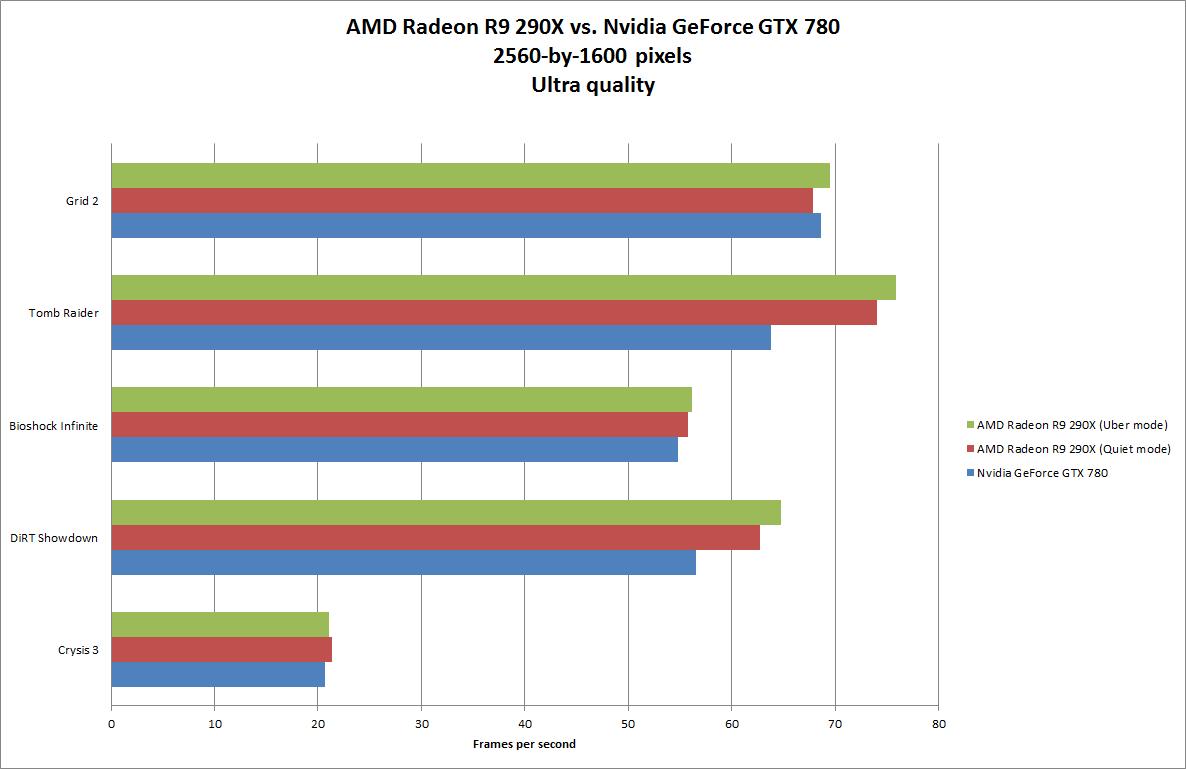
In our tests, we saw little difference in performance between the two modes—only a few frames per second in some games. In some instances (usually at lower resolutions), Quiet mode slightly outperformed Uber mode. But in either mode, the Radeon R9 290X was a little to a lot faster than the Nvidia reference card.
If flipping a switch seems too simple for you, note that the included Catalyst Control Center software has a redesigned OverDrive option for fine-tuning the overclocking of your graphics card. In this utility, you can increase overdriving as a percentage instead of as a clock speed.
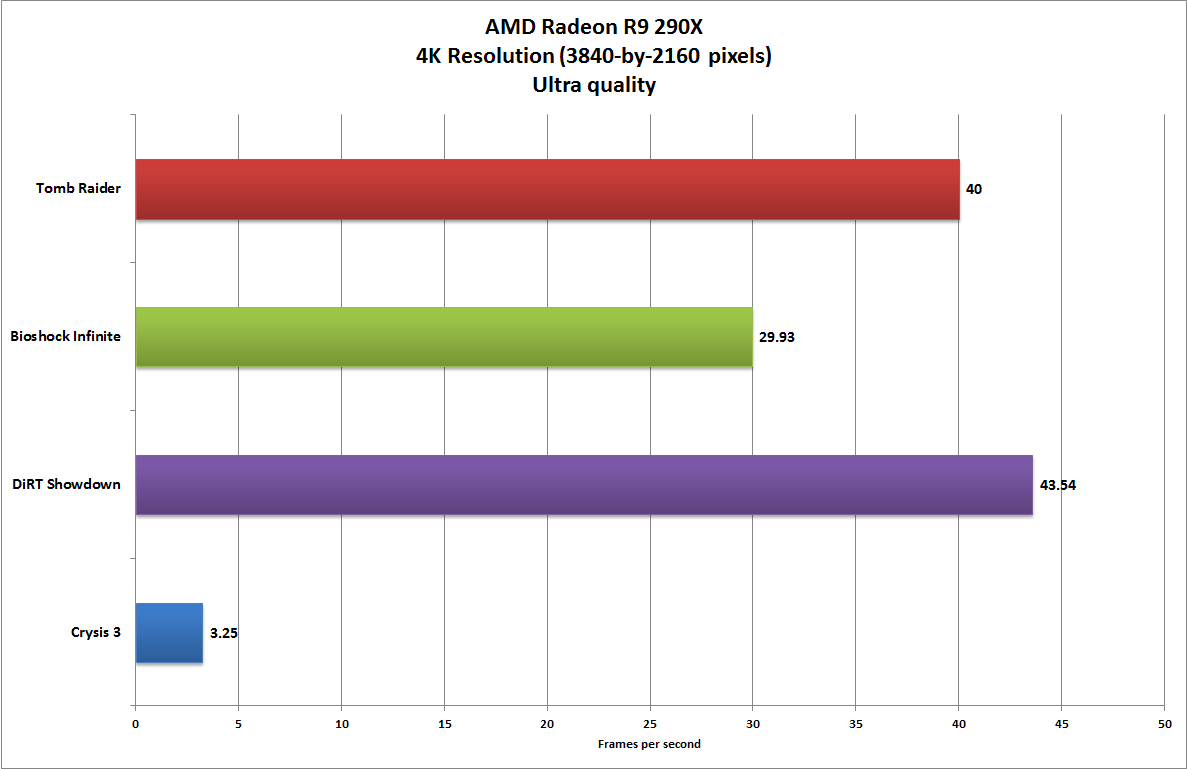
AMD provided a 4K monitor with the card so we could see how well the Radeon R9 290X’s focus on ultra-HD gaming has paid off. To push the card to its limits, we tried every game we had that could reach that resolution, and were impressed by the resulting decent performance. Nearly every game, except Crysis 3, ran at a playable 30 fps or better at Ultra quality—that’s with everything turned up to the max.
We measured the card’s running temperature at a blistering 95 degrees Celsius (203 degrees Fahrenheit). AMD said that the 290X can run at that temperature perfectly safely for its entire life, and that there’s no technical reason to reduce the target temperature—though you could lower it via OverDrive. Users who’d like to keep performance up and temperature down, should consider buying and installing a good after-market cooler.
Multiple-graphics-card enthusiasts can kiss those annoying, easy-to-lose CrossFire bridges goodbye. With the Radeon R9 290X, you can set up two cards in CrossFire mode simply by installing them on the same motherboard.
AMD’s reference design provides two DVI-I connectors, one HDMI port, and one DisplayPort on the mounting bracket. Using AMD’s EyeFinity multimonitor technology, you can connect as many as six displays to a single graphics card. GPUs in the Radeon R9 family now support up to three HDMI or DVI displays (previously the maximum was two), and the rest via the DisplayPort or DisplayPort adapters.
The Radeon R9 290X also uses ZeroCore Power, an energy-conservation feature that powers down the graphics card completely when the PC is in an idle state. A driver monitors tasks and display contents to determine whether applications are no longer actively changing the screen contents, allowing the PC to remain active without drawing power from the GPU. Activities such as file serving, video streaming, motherboard audio, and remote access remain available even in a powered-down state. When the GPU is required, the driver instantly wakes the card.
Suggested retail pricing for the Radeon R9 290X starts at $549, which makes it about $100 cheaper than the comparable Nvidia GeForce GTX 780. Of course, as retailers release versions with fancy extras, prices could very well reach GTX 780 levels. Based on the results of our hands-on testing, however, the Radeon R9 290X could be the new GPU to beat.
Source : PCWorld

AMD announced the next generation Volcanic Islands GPUs last month at their GPU14 Tech Day event in Hawaii. There were a couple of exciting announcements: a widely expected new flagship GPU, the R9-290X, that is meant to compete with Nvidia's GTX Titan, and there was also "Mantle," a new open-source API that at least on paper sounds like a great way to optimize games for the PC platform -- the fact that AMD is also powering Xbox One and PS4 graphics adds credibility to AMD's announcement, of course.
Unfortunately, we are not going to talk about either of those things today since the day hasn't come yet. We will get you up to speed about new Radeon graphics cards outside the R9 290X, however. AMD has done away with the Radeon 'HD' naming scheme that they have used for the past 6 years and replaced it with something a bit more complex.
Previous years have seen the release of a new GPU generation every year which makes the Radeon HD 7000's shelf life surprising, even more so considering the majority of the new RX 200 series cards rebadges from existing HD 7000 products. The RX 200 series will consist of the Radeon R7 240, R7 250, R7 260X, R9 270X, R9 280X and later this month the R9 290 and R9 290X. Confused yet? Well let us try and clear a few things up.
| GPU | Code-name | Price | Equivalent GPU* | Equivalent price at launch |
| Radeon R9 290X | Hawaii XT | ??? | -- | -- |
| Radeon R9 290 | Hawaii Pro | ??? | -- | -- |
| Radeon R9 280X | Tahiti XT | $299 | Radeon HD 7970 GHz | $499 |
| Radeon R9 270X | Tahiti LE | $199+ | Radeon HD 7870 | $349 |
| Radeon R7 260X | Bonaire XTX | $139 | Radeon HD 7790 | $149 |
| Radeon R7 250 | Oland XT | $89 | Radeon HD 8670/7730 | *OEM |
| Radeon R7 240 | Oland Pro | <$89 | Radeon HD 8570/7510 | *OEM |
The Radeon R7 240 is an overclocked version of the Radeon HD 7510 which was an OEM only part. The R7 250 is a new product that sits between the HD 7510 and HD 7570 (another OEM only part). Both are much slower than the Radeon HD 7750, so these shouldn’t be considered as gaming options.
The R7 260X is a rebadged Radeon HD 7790 that has been overclocked, with cards running at 1.1GHz opposed to 1GHz. Jumping up in speed we have the R9 270X which is a rebadged Radeon HD 7870 (more about these two in a second). Finally, the R9 280X which we'll eventually retest looks to be a direct copy of the Radeon HD 7970 GHz Edition.
So with almost nothing new to see here, what’s the point?
The specifications point to rehashed 7000 series parts and, well, so does the pricing. AMD has set the R9 280X at $300, the same price you can get 1GHz 7970 cards for, while the R9 270X is priced at $200, the exact same price as heavily overclocked 7870s. Meanwhile the R7 260X (rebadged HD 7790) will cost $140, while overclocked HD 7790 cards are currently selling for as little as $120.
Therefore it looks like we'll have to wait for the R9 290 series before we see anything truly new from AMD. Although we tend to keep you updated on how GPUs perform with the latest game releases, let this review serve as a guide if you're buying a mid-range GPU today and don't care to bother to read old reviews with old name schemes, and perhaps most importantly, older drivers and obsolete price points.
AMD Radeon R9 270X
The Radeon R9 270X, which has been given the codename ‘Curacao XT’, uses the 28nm design process comprised of 2800 million transistors in a 212mm2 die. Sound familiar? Well the Radeon HD 7870 GHz Edition, which was codenamed ‘Pitcairn XT’, also used the 28nm process and featured 2800 million transistors in a 212mm2 die.
The core configuration of the Radeon HD 7870 allowed for 1280 SPU’s, 80 TAU’s and 32 ROP’s and this is the exact same configuration used by the R9 270X.

Where AMD has made some changes is in the core and memory clock speeds. The 7870 ran a core speed of 1GHz without a boost feature and a memory frequency of 4800MHz, the R9 270X is a bit faster. The standard operating specifications see a core clock speed of 1.05GHz (5% higher) with a memory frequency of 5.6GHz, 17% greater.
While the memory is faster, the R9 270X still uses a 256-bit wide memory bus and by default comes with a 2GB memory buffer, though 4GB will be an option on some cards despite being pointless for this GPU.

The TDP rating is 180 watt which is slightly higher than the 175 watt rating of the 7870. Perhaps the most significant changes have been made to the API support which sees the R9 270X support DirectX 11.2 along with AMD’s Mantle. Pricing is set at $200 which matches the current retail value of a Radeon HD 7870 graphics card, so not a lot to get excited about here.
AMD Radeon R7 260X
The R7 260X is a budget card, though for some reason the new flamboyant name seems to suggest otherwise to us. Codenamed ‘Bonaire XTX’, it is an updated version of the ‘Bonaire XT’ aka Radeon HD 7790. Like the Radeon HD 7790 the R7 260X features the same 896 SPU’s, 56 TAU’s and 16 ROP’s, all of which fit in the same 160mm2 die area.

Again what we have here is an overclocked card which operates at 1.1GHz opposed to the 1GHz clock speed of the 7790. The memory has also been boosted from 6.0GHz to 6.5GHz. The end result is a core overclock of 10% and a memory overclock of 8%.

This has increased the TDP rating to 115 watts from 85 watts, a 35% increase in load consumption according to AMD’s figures. Despite the increased power consumption the card still only requires a single 6-pin PCIe power connector.
Source : TechSpot

Driver support for graphics cards can be a major stumbling block for would-be Linux gamers. Since fewer people use Linux (and most games are created with Windows in mind), driver support for the operating system can be a bit, well, hit-or-miss.
AMD
AMD has actually been pretty active in the Linux community in recent memory, though its open-source Linux drivers still lag behind its Windows drivers. Just a few months back, the company released a massive set of 165 kernel patches that enabled some key features in Linux Radeon drivers, such as dynamic power management and initial support for the "Sea Islands" family of GPUs.
AMD's holding a GPU showcase in Hawaii on Wednesday. A new series of graphics cards are almost certainly going to be the stars of the show, but corporate VP Raja Koduri said there will also be news concerning Linux driver support, according to AnandTech. The AMD GPU showcase is expected to start around the same time that Valve unveils its second Steam-related announcement for the week.
Nvidia
Nvidia's relationship with Linux has been a bit more, shall we say, tense.
In July 2012, after a woman at a group chat session described her frustrations trying to use Nvidia's power-saving Optimus technology, Linux creator Linus Torvalds launched into an expletive-riddled tirade.
"Nvidia has been the single worst company we've dealt with," he said, before turning towards the video camera and extending his middle finger. "Nvidia... F*** you!" he hissed, uttering the words slowly and sharply.
To be fair, Nvidia does a decent job of supplying basic (or better!) Linux drivers for its latest graphics cards, and the company took issue with the remarks. Nvidia's drivers, however, are closed source, and unlike AMD, it hasn't traditionally offered open source drivers or documentation, which doesn't sit well with fanatical Linux lovers.
That changed on Monday--the same day SteamOS was announced.
That day, Nvidia's Andy Ritger messaged members of Noveau--the group that reverse-engineers Nvidia's closed-source Linux drivers to create an open-source alternative--and said Nvidia developers working on the closed-sourced Linux GPU drivers will start paying attention to the Noveau mailing group, offering assistance when possible. Additionally, Ritger said Nvidia will provide more official help.
Source : Computerworld

AMD Catalyst 13.9 introduces support for Xorg Server 1.14, OpenGL 4.3 support, GLX_EXT_buffer_age extension support, dynamic primary surface resizing, UVD/Vsync/OpenGL fixes, Unigine Heaven 4.0 fixes, Left4Dead 2 fixes, SLED 11 SP3 support, and Linux 3.10 kernel support.
There's still no official announcement for this release, but the driver is now available for download, supporting both 32-bit and 64-bit architectures.
The AMD Catalyst 13.9 video driver offers production support for the following Linux-based operating systems: Red Hat Enterprise Linux 6.3 and 6.4, Novell SUSE Enterprise Linux 11 SP3, openSUSE Linux 11.4 and 12.1, and Ubuntu 12.04.2 and 13.04.
Source : Softpedia
.jpg)
Advanced Micro Devices unveiled its plan on Monday to release a line of chips next year for embedded systems in products such as digital signs and Internet-enabled televisions.
The company, which reported a net loss of US$74 million for its second quarter, said the market for chips in embedded systems is projected to rapidly expand, with demand for low-power and high-performance chips.
AMD said the release will include chips using ARM and x86 architectures.
The "Hierofalcon" CPU SoC (system-on-a-chip) will be based on the ARM Cortex-A57 architecture. AMD said it is the first 64-bit ARM based platform from the company designed for data center applications, communications infrastructure and industrial solutions. Production will begin in the second half of 2014.
"Bald Eagle" is an x86-based chip that will be available as a CPU and APU (accelerated processing unit). It's designed for high performance embedded applications, such as digital signs and gaming, AMD said.
The "Steppe Eagle" APU SoC, available in the first half of next year, is aimed at low-power applications. The last family, called "Adelaar," is designed for 3D graphics, multi-display support for the Windows and Linux OSes, AMD said. Adelaar will also be released in the first half of next year.
Other industries AMD said the chips will target include medical imaging, automobile, military and aerospace, digital surveillance and printing.
Embedded systems accounted for 8.6 billion unit shipments in 2012, according to analyst IDC in a July report. Shipments are expected to rise to 11 billion units by 2017, IDC said.
Source : PCWorld
Variety is the spice of the Lab, so this month we decided to eschew
our traditional builds and go with one you don’t see every day—an all-AMD gaming PC,
built with (most of) the best parts we could get our hands on. We’re
sure some of you will question the purpose of this build, so our
pre-emptive answer is we built it because we could, and we were curious
to see how a balls-out AMD build would benchmark, as we haven’t seen
over-the-top AMD rig since The Matrix: Revolutions
let us down. Plus, everyone is always ragging on us for ignoring AMD,
so here you go AMD enthusiasts—an entire PC built just for you.

We ended up pairing AMD's relatively new “Vishera” Piledriver CPU, the 4GHz FX-8350 (or “Octomom,” as we like to call it) with a totally jacked HD 7970 from Asus
and a small army of AMD-ish components, which we figured would make for
an interesting build. Finally, we’ve heard your feedback about how you
don’t need to see another picture of RAM being inserted into its slot,
so this month we’re going to talk about our component selection and the
building process instead of showing you how we actually built it.
source maximumpc
It’s Time to Choose
The impetus for this system was the release of the relatively new “Vishera” CPU from AMD along with an updated version of the Asus Crosshair V Formula Z motherboard running the 990FX chipset. We had just received both of these parts, so we knew what we had to do—take a lunch break to consider our options. While tossing back root beers we formulated the basis of the system—an AMD processor and motherboard were a given, but what else? We had yet to sample the overclocked HD 7970 DirectCU II TOP from Asus, so we added that to the equation. We then remembered AMD-branded RAM had just been announced, so we added that to the ticket as we ordered another round of brewskies. To finish the system, we settled on the Thermaltake V3 AMD edition chassis, some red-band Corsair AF120 case fans, and a red Corsair Force GS SSD, as well, to tie the room together.source maximumpc

In fact, looking at these systems from the top of the lid, they look almost exactly like Toshiba's highest-end laptop. Only once you get up close can you that they're thicker, with plastic lower bodies, but still very nice-looking as far a budget/midprice laptops go. The 14- and 15-inch models are a little different, as outlined here.
Toshiba Satellite E55 series
This 15-inch ultrabook-like laptop comes in both AMD and Intel configurations. It starts at $579, which is great for a midsize laptop that's so well-built (at least from the demo unit we got to play around with recently), but keep in mind that's for a version with an AMD CPU and no touch screen (model name: E55D). Selling a thin, sharp-looking, 15-inch Windows 8 laptop without touch feels a little incongruous in the second half of 2013, even for under $600.
A touch-screen AMD version (E55Dt) will be $679, while the flagship Intel version (E55t), featuring a touch screen and one of Intel's fourth-generation Core i-series processors, will be $899.

The Toshiba Satellite E45t.
(Credit:
Dan Ackerman/CNET)
This single 14-inch configuration is going to be a Best Buy retail exclusive, but also available from Toshiba's Web site. For $817 (which Best Buy will likely reduce to $799 in-store), you get an Intel fourth-generation Core i-series processor and touch screen, and Toshiba says we should consider this system a replacement for the very popular Satellite U845t, which had a similar price and configuration.
While they look nice for sub-$1,000 laptops, all four laptops mentioned here have 1,366x768-pixel native screen resolutions, which starts to feel a little old in the more expensive configurations.
The Satellite E45t will be available at Best Buy starting August 4, and the E55 series will be available starting in September from a variety of retailers.
source [[ cnet ]]
Subscribe to:
Posts (Atom)


Recent Comments