 |
| Google Play Music gets a new look for iOS 7 |
Source : iTunes

From the pictures he took and what he wrote a majority of the store was dedicated to Apple. While this is only one store it is a positive indication that China Mobile could aggressively market iPhones and iPads.
The price for an iPhone 5s is 4,380 Chinese Yuan which is $721 (a 16GB unlocked model in the U.S is $649) and a 5c is shown at 3,380 Chinese Yuan or $557 (a 16GB unlocked model in the U.S. is $549). There were no pictures with iPad pricing.
What I can’t tell is if there is any contract commitment required for this price and it is also a bit interesting that the price is on a handwritten piece of paper compared to the very good marketing material on display. It looks like the pricing was either decided at the last minute or kept under wraps so much that properly printed pricing was not distributed prior to the launch (which has still not officially occurred).
Via : Forbes
 |
| iPhone Air, iPhone 6c |
Even though the new iPhone 5s and iPhone 5c have only been available in stores for a few months, fans are already trying to imagine with help of concept renders and videos what the future iPhones may bring – that's exactly what the designers at SET Solution did in the iPhone Air and iPhone 6c videos that follow, via Nowhereelse.
However, while the renders look great and introduce some believable handset characteristics, they are not based in any way on what Apple actually has in mind for its upcoming generation of smartphones.
The imagined iPhone Air has a Touch ID fingerprint scanner, and a bigger edge-to-edge display, which are features we may very well see in the next-gen iPhone 6 model. But the iPhone Air is also tremendously thin, maybe too thin for what current mobile technology can support. We’re looking at 1.5mm thinness at the top, and just 3mm at the bottom of the phone. Moreover, with great thinness comes reduced weight as well, and this iPhone Air would weigh only 70g.
The iPhone 6c shown in the following video has a curved screen that just looks too fragile for its own good, albeit it’s still very interesting. In this instance, “C” stands for “curve” not just “color,” and the iPhone 6c would be somewhat similar to the existing LG G Flex that was just launched in certain markets when it comes to screen curvature. However, the iPhone 6c would still have a flat back, which means the top and bottom sides would be thicker than the middle section. Then again, we’ve seen plenty of wild smartphone concepts with curved displays lately, including some designs from Samsung, a company that has also launched its first curved handset. Other iPhone 6c features would include a Touch ID sensor, an edge-to-edge display, and a variety of colors for the plastic case.
The imagined iPhone Air has a Touch ID fingerprint scanner, and a bigger edge-to-edge display, which are features we may very well see in the next-gen iPhone 6 model. But the iPhone Air is also tremendously thin, maybe too thin for what current mobile technology can support. We’re looking at 1.5mm thinness at the top, and just 3mm at the bottom of the phone. Moreover, with great thinness comes reduced weight as well, and this iPhone Air would weigh only 70g.
The iPhone 6c shown in the following video has a curved screen that just looks too fragile for its own good, albeit it’s still very interesting. In this instance, “C” stands for “curve” not just “color,” and the iPhone 6c would be somewhat similar to the existing LG G Flex that was just launched in certain markets when it comes to screen curvature. However, the iPhone 6c would still have a flat back, which means the top and bottom sides would be thicker than the middle section. Then again, we’ve seen plenty of wild smartphone concepts with curved displays lately, including some designs from Samsung, a company that has also launched its first curved handset. Other iPhone 6c features would include a Touch ID sensor, an edge-to-edge display, and a variety of colors for the plastic case.
The new channel leverages location information from your GPS, cellular, WiFi or iBeacon data and uses it as a "trigger" -- something that initiates an automated action. For example, you can instruct IFTTT to send a text message to your loved ones as you're arriving at your destination, or get an email when one of your Foursquare friends checks in somewhere near your apartment. If you use a Philips Hue, have it do a crazy light show to announce your upcoming arrival. There are plenty more ideas where those came from, but you'll have to go take a look at IFTTT's full listing of services and come up with a few clever recipes of your own as well.
Source: IFTTT
Via : Engadget
 |
| Griffin Survivor |
I absolutely loved this case. It's got excellent screen and bezel clearance, and what I think is an ideal mix of rigid polycarbonate housing combined with a very ample amount of silicone rubber.
I used the Survivor for iPad Air for about a week, and although this is without question one of the heaviest, shock and impact-resistant cases you can buy on the market, it didn't feel like I was holding a brick.
The polycarbonate and the silicone rubber seems to organically "merge" together, particularly in the way the tablet itself gets encased.
Both rubber and polycarbonate is shaved off in appropriate spots so the case has sort of a sculpted look, while at the same time removing excess material and lowering the weight as much as possible and still being highly protective, particularly on the corners.
Like many other hardcases on the market, it integrates a permanent (transparent) screen protector. And rather than going for a shock cover with integrated easel/stand like the OtterBox Defender, it includes a clip-on, lightweight stand/easel for propping the device up to watch videos and other content.
The Survivor is also the only hardcase i've seen that allows you to seal every single one of the ports so as to maximize dust and liquid protection. This includes the rear camera window, which can be opened and closed with a silicone rubber and polycarbonate flap.I found this accessory to be somewhat difficult to snap on and Griffin's design is also very modern and attractive looking, especially if you are using one of the six different color combinations, which are matched to Apple's native animated wallpapers in iOS 7.
Via: ZDNet
The newest iPad Mini with Wi-Fi and cellular capability (3G/4G) has yet to reach carrier stores in the US, pointing to Apple's tight control of supply.
Verizon shows the iPad Mini with Retina Display back ordered until December 16, as of Friday morning Pacific time, while AT&T is still showing 21-28 days when the device is ordered online.
Neither carrier, when contacted by CNET, could provide information about when the iPad MiniRetina would reach its stores.
 |
| iPad Mini Retina |
T-Mobile's Web page for the iPad Mini Retina is showing, as of Friday, that the tablet will be "available for shipment soon," but no target date is given.
Meanwhile, the availability of all iPad Mini Retina models -- both Wi-Fi-only and cellular versions -- on Apple's store page has improved somewhat: availability is now 5-7 days, a slight improvement over the 5-10 days that the company had been showing last week.
Cellular models of the iPad Mini Retina are also available for walk-in purchase at many Apple stores across the US, despite the fact that this is not possible at Verizon and AT&T.
Apple's CEO Tim Cook was cautious about supply of the Mini Retina during Apple's fourth-quarter earnings conference call.
"It's unclear whether we'll have enough for the quarter or not," Cook said.
Rhoda Alexander, director of Tablet and Monitor Research at IHS iSuppli, points to initial "production problems" as the reason for Apple's tight control over supply of the tablet.
"Even though they were able to ramp up more quickly than anticipated in November and December it still takes a while to get those products out," said Alexander. "So, they're managing the rollout very carefully."
The availability of the iPad Mini Retina cellular models contrasts with the iPad Air sales launch. When Apple started selling the iPad Air on November 1, it was available at Verizon, AT&T, and other carriers on the same day. Currently, carrier outlets like Verizon and AT&T typically have the Air at stores.
The new iPad Mini sports a 2,048x1,536-resolution display that boasts 326 pixels per inch -- one of the highest of any tablet to date. Analysts believe the display has been a challenge to make in the large volumes that Apple demands.
Source : CNET
Image : Apple

A Nokia Lumia 2520 eval unit arrived the day before Thanksgiving and two days later I am venturing out to purchase my own Lumia 2520 while my 3rd generation LTE iPad goes up for sale.
A couple weeks ago I bought an Apple iPad Air after Kevin convinced me to go look at one on MobileTechRoundup show #309. It wasn't enough of an upgrade over my existing 3rd generation to justify the $900 (I bought a $829 64GB model with tax) and I returned it two days later.
To be honest, I am a bit surprised there isn't more support for the Nokia Lumia 2520 when it is priced $230 less than the comparable iPad. There is even more value when you add in a microSD card for a third of what Apple charges to increase storage capacity. Nokia has a keyboard offer until this weekend too so that is another $149 savings, making the Lumia 2520 a great deal at $500 with no contract.
Given the large cost savings of at least $230, really about $300 when you add in a 32GB microSD and compare directly to the 64GB LTE iPad Air, and the free $149 keyboard/battery offer it is an easy decision to switch to the Lumia 2520 given my usage needs. My only decision now is whether I purchase a Verizon or AT&T model.Source : ZDNet

The Apple (NASDAQ: AAPL ) Store is not known for discounts, opting instead to attract shoppers with a combination of compelling merchandise and superior customer service. Black Friday is the only day of the year that you can count on seeing markdowns at the Apple Store. Even then, the deals never match up to the doorbusters offered at other retailers.
Apple's Black Friday "problem"Apple has a problem coming into Black Friday. It just released the iPad Mini Retina, which is sure to be in high demand, but Apple does not have much supply available yet. (All things considered, it's a good problem to have!)

The iPad Mini with Retina Display. Photo: Apple.
While Apple's inventory is a closely guarded secret, it's still
possible to gather "clues" from the supply chain and from retail
outlets. For example, Rhoda Alexander, an analyst for IHS iSuppli, found
that Apple will be able to ship less than 4 million units
of the new iPad Mini this quarter. By contrast, Apple shipped 8.9
million iPad Minis in last year's December quarter -- and still could
not fully meet customer demand!Meanwhile, Brian White of Cantor Fitzgerald surveyed Apple Stores last week, and found that most iPad Mini Retina configurations were unavailable for in-store pickup at most locations. Cellular-enabled models seem particularly hard to come by, with lead times piling up at the major wireless carriers.
This creates a risk that throngs of customers will come to Apple Stores on Black Friday hoping for an iPad Mini Retina, only to find that the stores are out of stock. There's not much Apple can do to boost availability of the iPad Mini Retina next week, but it could try to "upsell" customers to the iPad Air.
Similar hardware, different priceWhereas the first-generation iPad Mini was essentially a shrunken iPad 2 in a much sleeker form, this year the iPad Air and iPad Mini Retina are virtually identical, except for size. The iPad Air provides approximately 50% more screen "real estate," and costs an extra $100.

The iPad Air. Photo: Apple.
Some customers will prefer the Air's larger screen size, while those
who are particularly focused on portability may prefer the smaller form
factor of the Mini. However, in between, there will almost certainly be a
large group of potential customers who are more or less indifferent
about screen size. These individuals are likely to gravitate toward the
Mini because of its cheaper price tag.Apple's goal on Black Friday should be to sell as many iPads as possible. Since the iPad Mini Retina will be in very short supply, Apple should promote the iPad Air as an alternative. Dropping the iPad Air price would help lure customers who were looking for an iPad Mini Retina mainly due to its lower cost.
Getting to within $50Last year, Apple offered $41 off the fourth-generation iPad on Black Friday. That put the base model price at $458, which is $59 more than this year's base price for the iPad Mini Retina. I would like to see Apple get the iPad Air starting price down to $449 or less for Black Friday. Offering a 50% larger screen for just $50 extra should be a compelling enough value proposition to entice some would-be iPad Mini Retina buyers to buy an iPad Air instead.
Apple can afford to do this insofar as the iPad Air is actually cheaper to build than previous full-size iPads. Furthermore, since the biggest difference between the iPad Air and the iPad Mini Retina is the screen size, it's likely that the difference in production cost is actually less than $50. Thus, Apple would make more money selling an iPad Air for $449 than selling a full-price iPad Mini Retina.
A potential hitchThere's one potential hitch that would undermine this plan: insufficient supply of the iPad Air. While the iPad Air was in relatively plentiful supply at launch, lead times have been expanding. As of Thursday, Apple's online store was reporting a five to seven day shipping time frame for all iPad Air configurations.
It could be that Apple is holding back inventory in order to make sure it has enough product to sell in stores on Black Friday and thereafter. However, if a real iPad Air shortage is developing, it would not make sense to sell the product at a discount and then run out of stock.
Foolish takeawayApple has a good chance to deliver a blowout holiday quarter, primarily on the back of strong iPad demand. One of the few significant threats to growth for the iPad product line is low supply of the iPad Mini Retina. If many potential iPad Mini Retina purchasers want to buy it as a holiday gift, they will just find something else if it's not available.
A significant iPad Air sale for Black Friday could mitigate this risk by convincing people who came to the Apple Store looking for the iPad Mini Retina to go with the iPad Air instead. This would give Apple the ability to boost December quarter iPad sales well beyond the market's expectations.
Interested in the next tech revolution?Then
you'll need to learn about the radical technology shift some say forced
the mighty Bill Gates into a premature retirement. Meanwhile, early
in-the-know investors are already getting filthy rich off of it... by
quietly investing in the three companies that
control its fortune-making future. You've likely heard of one of them,
but you've probably never heard of the other two... to find out what
they are, click here to watch this shocking video presentation!
Imagine owning Amazon.com (up over an insane 4,000% since 2001) when Internet sales rendered big-box retailers obsolete... Now an industry 99% of us use daily is set to implode... And 3 established companies are perfectly positioned to take advantage of this game-changing economic shift. Enter your email address below to find out how YOU can take advantage!
Via: FOOL

Blocking phone calls, numbers or messages is amount the standard feature in the modern Smartphone. Let us face the truth that there are many people from whom we just don't want to hear from.
So it is very baffling that the Cupertino company has not allowed blocking of text messages and calls into its brand new & completely redesigned Apple iOS 7 firmware.
iOS 7 Block Option & How to use it
So in the new iOS 7 you can easily block unrelenting exes, irritating friends, spammers, as well as telemarketers. Here is the method using which you can block iMessages, calls and texts in iOS 7.
iOS 7 Block Option & How to use it
So in the new iOS 7 you can easily block unrelenting exes, irritating friends, spammers, as well as telemarketers. Here is the method using which you can block iMessages, calls and texts in iOS 7.

The process is a lot similar to blocking calls on iOS. You just need to go to Settings and then Phone/Facetime and select Blocked option under it and start adding unwanted contacts in your block list. Again the block list is applicable to text messages, calls, iMessages as well as FaceTime calls. This means that even if you want to bock messages from a contact, you will also be blocking his calls too. At present there is no particular way to block only calls or messages.
How to Block Text Messages in iOS 7?

How to Block Unknown Numbers in iOS 7?

Now the question arises that what if you want to block a number that is not a contact saved on your phone. The process is also almost same. To block any number that you have recently came across, you need to go to Contacts and then select the recent option. There you are going to see an “I” symbol that is located on right next to contacts name. Tap the “I” symbol next to the contact whom you want to block and then scroll down and you are going to find “Block This Caller”. All you need to do is to select that and it is done.
To block any number who has just messaged you, you need to go to Message application, track down the contact, tap on the conversation, and you will see the contact button present on the top right corner. There you will see the same “I” button, tap on it, scroll down, and the select the Block This Caller option.
How to Unblock a Blocked Person in iOS 7?
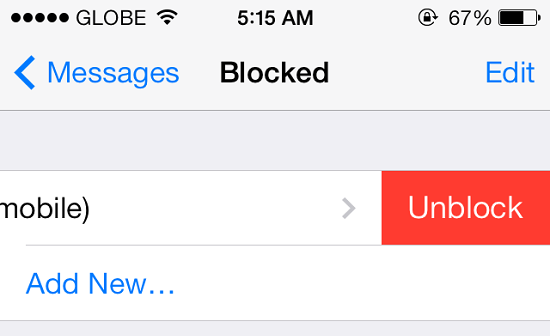
If you want to unblock a person, that is very easy just like blocking any number. You just need to go to Settings and select any of the Messages, Phone or Facetime option and scroll down to select Blocked option. Then you will be able to see the official blocked list. To unblock, simply swipe it to left on the name and a red button is going to appear.

You might be looking to snag a tablet for yourself or for your loved one. But before you venture out to a brick and mortar store or get lost scouring for websites and looking for deals, take a step back. Like everything else in life, tablet shopping is easier if you have a plan.
There are so many tablet options available, it’s easy to be overwhelmed by all the possible criteria. You’ll have to consider size and weight, how long the battery lasts, and which platform offers the apps and services you use the most. Let us help you with our guide on what to look for when you’re in the market for a tablet, and what to avoid so that you don’t needlessly spend money on something that turns out to be a dud.
Be sure to check up our updated list of the best tablets out on the market right now for specific recommendations.
Choose a platform
Most tablets will let you do common tasks like read books, browse the Web, play music and games, or watch movies and videos. But not all of the platform ecosystems are built the same.
One of the easiest ways to consider which platform best suits you is by looking at the devices you already have. For instance, do you have an iPhone that hooks up to a MacBook or a massive iTunes media library? Then you might want consider the iPad to help seal the circle and keep things easily synced across devices. Or, maybe you’re platform agnostic and wouldn’t mind a tablet with a bit more malleability? Google’s Android-powered Nexus 7is a worthy choice. Alternatively, if you’re a member of Amazon Prime and find yourself pooling money into the site on a constant basis, then consider hooking yourself into its vast array of movies and e-books by bringing home a 7- or 8-inch Kindle Fire HDX.
Bear in mind that not all Android tablets are created equal: many of them either run older versions of Android or the manufacturer will offer up their own version with a customized interface that requires its own learning curve. Companies like Samsung and LG are notorious for this, and they package up the devices with their own bundle of applications—many of which you can’t remove.
What will you use it for?
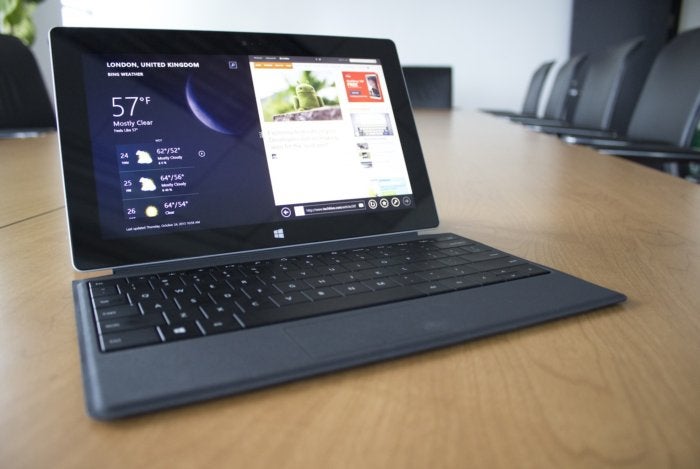
Those of you aching to be productive with a tablet that’s easier on your back than a laptop might want to pay mind to Microsoft’s Surface 2, which uses a touch-friendly version of Windows 8.1. However, you’ll have less of an “entertainment tablet” experience with the absence of the some apps and games that are popular on other platforms. The iPad Air is also good for this reason as Apple offers its iWork productivity suite for tablet users, in addition to iCloud, which works with both your Mac and iPhone as well as your browser.
If you’re e-book and movie crazy, any modern device will do, especially since Hulu, Netflix, and the official Amazon Kindle app are available on almost every device.
Go big? Stay small?
After you’ve determined which ecosystem to stick with, you’ll have to pick a size. Tablets come in several sizes, beginning with 7-inch screens and getting as big as 10.1 inches. It’s useful to think of it as two size categories: “big” tablets over 9 inches, and “small” tablets in the 7 to 8-inch range.

Smaller tablets travel better because they’re lighter and more compact, but you’ll also have to consider how the device fits in with the rest of your stuff. For example, the full-size iPad Air will take up almost as much space in your bag as an 11-inch MacBook Air.
The tablet size will also affect how it feels to hold the device. Devices like the second-generation Nexus 7 are comfortable to hold with one hand, but if you like to read, you’ll have a better grip on a rocky transit ride with the shorter 7-inch Kindle Fire HDX. Of course, tablet size also determines the display size, which brings us to our next criteria…
Resolution matters
Remember that the bigger the tablet, the bigger the screen size, and the heavier the weight. If multitasking is your main concern and you want a tablet for both productivity and entertainment, a larger screen-size will make everything look better and give you more space to work with, but you’ll be carrying more weight around.

A really high-res display like the Retina display in the latest iPad mini from Apple, makes text look crisp and reduces fatigue when reading for long periods. For watching videos and movies or for a tablet that will entertain the kids, it’s more important that the screen be large than especially hi-res.
Processor performance
You may not be concerned with having the latest processor—you may not even be familiar with which tablet processors are new and fast and which are old and slow. But going with an older tablet because of its low price point may end up costing you in the long run. As apps and games are updated, they’ll require more hardware resources, thus making them incompatible with the hardware you have inside your tablet.
The current processor landscape looks like this: quad-core processors from companies like Qualcomm are all the rage these days and help make for some very speedy devices. They’re usually coupled with about 2GB of RAM and can be found in most Android devices, including Samsung’s Galaxy Note 10.1 2014 Edition. Nvidia hasn’t been too successful in the system-on-a-chip (SoC) wars in the last year, but the initial reviews of the Tegra Note 7 and Microsoft Surface 2 seem to suggest that a revival is on the horizon. Apple makes its own chips, and its latest, the iPad Air, features a very fast 64-bit A7 processor.
Ports
If you’re looking for external connectivity, the Surface Pro 2 has the most to offer with both a USB 3.0 port and microHDMI to hook up to your TV. The iPad has one sole proprietary port with a selection of attachable dongles for things like SD cards and USB cameras—all sold separately—while some Android tablets come with either an HDMI or USB port, in addition to a MicroUSB port that sometimes supports Miracast, which tethers the tablet to your TV.
Penning with a stylus
If you like drawing, sketching, or just scratching out ideas, the Android-powered Samsung Galaxy Note 10.1 2014 Edition comes with its own dockable stylus called the S-Pen. It features a button you can press with your index finger to bring up additional apps to help you get all of it out on virtual paper. Many Windows 8-based tablets also come with styluses to enable you to take advantage of the built-in digitizer, like the Surface Pro 2, which features Wacom tablet technology.

If you’re really keen on the iPad though, you could always look at the vast array of third-party styluses, but the iPad’s capacitive screen is not really optimized for stylus input.
Buying a tablet for everyone
It’s likely that the tablet you’re considering isn’t just going to be used by you, but by other members of your family, too. Apple’s iPad only offers password-protected restrictions, while both the Kindle Fire HDX and Nook HD+ offer special kid-friendly modes. Amazon calls its feature FreeTime, which lets you control your child’s access to content on the device; the Nook offers up to six password-protected profiles with parental controls. Windows 8.1 allows you to set up multiple accounts and set restrictions on them, too.
Android features a better implementation for multi-user accounts by offering restricted profiles in tablets running Android 4.2.2 and later. You can allow each member of your family to have their own profile complete with their own customized Home screen and apps. The restricted profile just ensures that only the main user of the device will have complete access to things like apps and system settings. You can also set it up to keep your kids from going trigger happy in the Google Play store or downloading apps with mature content.
You’re ready to buy
Now that you’ve got your list of things to look for and money burning a hole in your pocket, it’s time to finally pick up that tablet.
First and foremost, look for any deals on tablets from your favorite stores. Some previous-generation models may be offered for less, but consider whether their aging processors will outlast the constant barrage of software and app updates. You might find clearance deals on older models of once-popular tablets, and while they’ll work fine for sending emails, reading books, and surfing the Web, the buck stops there. If that’s really your only interest, grab a device like the last-generation Nexus 7, which is currently going for $99. It won’t receive any other Android updates after the current version of KitKat, however. Also, Apple is usually better about keeping older versions of its hardware updated for as long as feasibly possible, and its refurbished iPads and iPad minis aren’t a bad idea either.

Don’t immediately run to your carrier looking for a deal on a 4G-connected tablet. Many mobile carriers will offer a tablet at a subsidized price, but tablet technology advances so fast that you’ll likely either still be paying off that tablet when the new one comes out, or get stuck on contract with something that’s in danger of becoming outdated.
Via: PCWorld

The reason behind iOS 7 defaulting to minute increments for calendar appointments is beyond me. Have you ever scheduled a meeting for 8:03? I know I haven't.
In previous versions of iOS, the calendar would increment by 5 minutes, which makes a lot more sense. As it turns out, iOS 7 offers the same functionality, you just need to change a simple -- but hidden -- setting.
As WonderHowTo pointed out, a quick double-tap on the minute column when adding an appointment will change it from 1 to 5 minutes.
Sadly, the change doesn't remain in place; you'll have to change the increment again the next time you add an appointment to your calendar. But in the end, you can save some scrolling time with a quick double-tap.
Image : CNET
Source : CNET

While it was a bit of a surprise that Walmart decided to sell the brand-new iPad Air at a $20 discount (given Apple's reluctance to let retailers drop prices on its products at launch), it should come as no surprise that its competitors have decided that if they can't beat 'em, join 'em.
Target has officially dropped its price to match the $479 sticker, including online (as shown above, though it's currently unavailable). Best Buy, on the other hand, still lists the new iPad at Apple's original $499 price, but apparently will price match the other deals if you show proof of the discount (which shouldn't be that hard to do). Staples is also offering the iPad Air at $479, including online.
The price drop no doubt eliminates most of whatever margin non-Apple retailers would keep from the iPad sales, but the stores hope that they can make that difference up by selling cases and other accessories and high-margin protection plans (as shown above, Target is offering a $119 service plan).
Despite earlier reports to the contrary, Apple is apparently not price matching these discounts at its stores. There are also no discounts on other iPad Air configurations beyond the 16GB Wi-Fi base model.
Will the $20 discount entice you to buy the new iPad Air at Walmart, Target or other stores instead of through Apple? Let us know in the Talkback section below.
Via: ZDNet

Two years ago this month, a report on The Daily claimed Microsoft had built a version of Office for the iPad and was demonstrating it privately. Ever since, folks have been on the hunt for the elusive Office for iPad.
A month ago, Microsoft execs basically confirmed Office for iPad exists, but said it wouldn't be released until after Microsoft delivers its own, touch-first set of core Office apps, which I've been calling "Gemini."
Along with other Microsoft watchers, I've been wondering whether Microsoft was simply sitting on Office for iPad, delaying it to give its own Surface tablets a leg up. A year ago, Microsoft's ARM-based Surface RT shipped with Office RT bundled for free, and this October, the ARM-based Surface 2 shipped with Office RT plus Outlook RT, bundled for free.
But now that Apple's cut to zero the price of iWork (not the original, mind you, but a less feature-rich version), what's Microsoft waiting for?
After digging a bit, I've heard from my sources that Microsoft's "delay" in releasing both its own "Gemini" apps, as well as touch-centric versions for the iPad and Android tablets may be about a new and evolving product strategy as much (if not more than) about internal politics.
And no, it's not Microsoft execs telling me this to save face. I haven't been able to get the Softies to talk about Gemini or Office for iPad, in spite of repeated requests.
Revisiting the 'Gemini' waves
As I've blogged before, Microsoft's original "Gemini" plan wasn't just about the development of touch-centric versions of Microsoft's core Office apps. Gemini also was about bringing Office to platforms beyond Windows.
Gemini, as originally conceived, consisted of a series of waves. I'd heard the Metro-Style/Windows Store versions of the core Office apps -- Word, Excel, PowerPoint and OneNote -- were supposed to be part of Gemini Wave 1, according to the original plan. Microsoft execs, for their part, have said a touch-first/Metro-Style version of PowerPoint that was demonstrated publicly at Build this year was always supposed to debut in 2014.
Office apps weren't initially designed in a way that made them easy to port from Win32 to other operating sytems, as cross-platform support wasn't part of Microsoft's goal for Office from the get-go. They also weren't built for touch devices; they were built to work best in a desktop/mouse/keyboard world. Yes, Microsoft has developed a suite of Office Mobile apps that work on touch-first iPhone, Android and Windows Phone devices. But these Office Mobile apps don't share the same core as the current desktop Office suite.One of my sources told me that the apps I've been calling Gemini are referred to internally as WinRT apps. This makes sense, given these apps, unlike the current Word, Excel and PowerPoint that run on Microsoft's Surface devices, are not Win32/desktop apps. The WinRT apps are going to be Metro-Style/Windows Store apps. (OneNote already exists as both a desktop app and a Metro-Style app.)
To get the core Word, Excel, PowerPoint and OneNote apps to work natively on touch platforms, Microsoft is basically having to start almost from scratch. The Office team is having to redo the UI to include an updated ribbon model. They've had to rethink what a touch-first (as opposed to afterthought "touch mode) interaction experience should be. These days, Office apps need to be able to work on devices with screens of all sizes, from phones, to laptops, to desktops, to servers, to Perceptive Pixel displays.
There are more new development requirements. These WinRT apps, along with their non-Windows siblings, also need to be designed to take advantage of the cloud, since the new default is to save files to the cloud. And they need to insure that document formatting isn't lost when moving between/across different Windows- and non-Windows environments.
The WinRT apps won't replace entirely the desktop versions of Word, Excel, PowerPoint and OneNote, I hear. Desktop versions will remain for the foreseeable future those who want all the Office bells and whistlesm as well as the adjunct Office apps like Publisher, Visio, etc. (I do hear InfoPath is one of those apps that won't be carried forward, although Microsoft officials aren't saying this publicly.) But WinRT apps will become the focal point, and their newly designed UI and core will be the basis for Office on all other Windows and non-Windows platforms, including phones, tablets and the Web.
I do strongly believe there is a version of Office for iPad out there. I've talked to individuals who say they've seen it. But it sounds from my sources like Microsoft's thinking and development strategy may have evolved on the Office front since 2011 when company reps began shopping around and showing off Office on the iPad.
I'll be interested to see if the Metro-Style WinRT suite of apps that Microsoft is building, and which might debut by late spring/summer 2014, includes the Reader and Remix apps that Microsoft execs supposedly demonstrated at the company meeting in September, alongside the core Word, Excel, PowerPoint and OneNote.
Via: ZDNet

iFixit has completed its iPad Mini Retina display teardown and done things to a new iPad you'd never dream of doing. After mercilessly opening it with suction cups and guitar picks, the team discovered the following:
- While "mini" tends to denote added cuteness with compromised functionality, this Mini packs a resolution of 2048 x 1536—just like the iPad Air. The same resolution in a smaller screen means enhanced pixel density—326 ppi on the Mini versus 264 ppi on the Air.
- Our little Retina has an LG display, powered by a Parade DP675 LCD driver, similar to the DP655 found in the iPad Air.
- To the surprise of no one, we find affixed dual Broadcom BCM5976 touchscreen controllers—much like we've seen in a host of recent Apple products including the iPad Air and iPhones 5 and 5s.
- The battery weighs in at 3.75 V, 24.3 Whr, 6471 mAh—a huge bump over the 16.3 Whr battery seen in the previous Mini. It seems we've found the source of the Retina's thicker skin; as Apple still pegs the battery life at 10 hours, we suspect the extra juice is being funneled into the swanky new display.
- Instead of glue, the logic board is seated over a couple of screwposts for security—a mini win for repairability! The only adhesive is a bit under the panhandle full of connectors, and a solid swath under the Lightning connector cable.
- Holy holes, Batman! What's this? Wi-Fi-only Minis of yesteryear featured a blank expanse at the end of the logic board—just a flat space where the cellular chips would be. This Retina Mini's board has a nifty cutout instead.
Here's the details on the chips inside the new iPad mini:
- Apple A7 APL0698 SoC—The same part number as seen on the iPhone 5s
- Within the A7 package is Elpida F8164A1PD 1 GB LPDDR3 DRAM
- NXP LPC18A1 (Apple M7 Motion Co-Processor)
- Toshiba THGBX2G7B2JLA01 16 GB NAND flash
- B334 STMicro MEMS accelerometer/gyroscope, the same as seen in the iPad Air
- Apple 338S1213 Cirrus Audio Codec
- Apple 338S1199—likely audio amplifiers similar to those found in the previous iPad mini
- Apple 343S0656-A1—likely a variant of the Dialog PMIC found in the iPad Air
- Fairchild Semiconductor FDMC6676BZ and FDCM6683 MOSFETs
Via: ZDNet
Apple iPad Air
A new high-water mark in tablet design, the iPad Air(MSRP $499.00) is tough competition for anyone looking to steal market share away from Apple. While the Air's hardware is largely unimproved over the previous generation, the tablet's battery life and processing power remain more than adequate. Despite a mere 1GB of RAM, an unaltered display and a smaller battery, the iPad Air is one of the best tablets we've ever tested. It might not move the goalposts, but the Air has nearly perfected Apple's winning iPad formula.
It was a busy week for tablet reviews. In addition to the iPad Air, we reviewed theApple iPad Mini with Retina Display and the Microsoft Surface 2!
2014 Volvo S60 T5
The 2014 Volvo S60 T5 (starting MSRP $33,115) marks what is likely the final appearance of the five-cylinder car engine. The Swedish automaker has been using a version of its five since 1993 but is replacing it with turbo- and supercharged four-cylinder engines next year.
That's not a bad thing: We found the five lacks passing power, and its fuel economy was nothing to write home about. Inside, the car offers some nifty onboard tech, including the Sensus Connected Touch infotainment system, plus some of the most comfortable seats on the market.
The new Canon EOS 70D (MSRP $1,199.99) is an excellent DSLR for taking still photographs, but that's not what makes it so special. What sets the 70D apart is its new Dual Pixel AF, which makes it the first DSLR that can truly shoot video like a camcorder. With its new focusing technology, the 70D can track subjects quickly and quietly, lock onto faces with ease, and switch between subjects without distracting jumps in focus.
Overall image quality is very good, though the camera stumbles slightly in very dim situations. And control freaks will be happy to see that there's certainly no shortage of buttons and dials. Ultimately, the substantial segment of shoppers who already own a Canon Rebel and are looking for an upgrade should be eyeing the 70D. It's as close as any camera gets to a complete package, which earns it our Editor's Choice award and Best High-End DLSR trophy for 2013.
Features: Smart Homes, Appliance Libraries, a Plague of Rust, and Silly Kickstarter Projects
• Revolv Looks to Simplify the House of the Future: Have you heard of Revolv? If not, that may change soon. The $300 device controls your home's connected locks, lights, outlets, thermostat, stereo and more from a single app. Intrigued? Read our profile of the Colorado start-up and look forward to the smart-home revolution.
• Appliance Lending Libraries a Hit With Savvy Urbanites: Don't you wish you could use certain kitchen gadgets just once — say, for a big family dinner — without having to buy them? A pair of new appliance lending libraries in Portland, Ore., and Toronto are providing that exact service, and we here on the East Coast are left pining for something similar.
• Rash of Rusting Appliances Has Consumers Rattled: Stainless steel is a hot-button issue. Don't believe it? Just check out the comments on this article. This week, we took a look at the science of rust and tried to find out what's behind a wave of consumer complaints about prematurely rusting stainless-steel appliances.
• Snack Safes and Spatulas: 7 Unlikely Kickstarter Successes: Kickstarter has successfully funded nearly 52,000 projects, but we'd still be hard-pressed to say for sure why proposals on the crowdfunding platform fail or succeed. Sometimes, it seems almost random. This week we collected seven improbably successful Kickstarter campaigns for your gawking pleasure.
Check out more of our fun and enlightening features here.
Kenmore 71602 Refrigerator Review
Simple and effective, the Kenmore 71602 (MSRP $1,879.99) is a spacious option for consumers who want a no-frills fridge at a decent price. The controls are limited to a mere four buttons, but who needs complicated doohickeys when you have top-notch performance?
The 71602 excelled in nearly all of our tests. Temperatures were notably consistent throughout, especially in the freezer. Moisture retention in the crisper drawers wasn't the greatest, but the overall performance, capacity and efficiency of this French door — not to mention its affordable price — make this fridge a decent option for most kitchens.
Audio-Technica ATH-ANC7b Headphones Review
Audiophiles won't be clamoring for the Audio-Technica ATH-ANC7b headphones(MSRP $199.95), but if you're a budget shopper in the market for 'phones that will hush the maddening sounds of last-minute of Thanksgiving travel, these over-ears might do the trick. These sturdy cans are perhaps too firm for the average dome, but the removable cord and accessible noise-cancellation switch are design perks everyone will enjoy.
As for the performance, distortion isn't an issue, but bass muffles portions of the high midrange. The real treat here is the active noise cancellation. From high-pitched annoyances like nearby conversations to bassy rumbles from planes or buses, these headphones can greatly reduce outside sounds. That's certainly a perk for travelers, but be warned: These things leak noise! So if you're embarrassed about your affinity for a certain Bieber, be modest with that volume knob.
Via: Usa Today
Subscribe to:
Posts (Atom)


Recent Comments