 |
| Exploit of a Linux |
A security researcher with George Washington University, DiMino noticed several IP addresses attempting to hijack the Linux server by exploiting a now-patched PHP flaw that gave attackers the ability to remotely execute commands on vulnerable machines. DiMino was curious to know what the people behind the attacks intended to do with his machine, so he set up a "honeypot" box that, for research purposes, ran an older version of the Web development language.
The attackers' HTTP POST request contained a variety of commands that in short order downloaded a Perl script that was disguised as a PDF document file, executed it, and then deleted it. To ensure success, the attackers repeated the steps using curl, fetch, lwp-get requests. The Perl script was programmed to sleep for periods of time, presumably to prevent administrators from noticing anything amiss. Eventually, the compromised machine connected to an Internet relay chat channel, where it downloaded another script and executed it. Then he ran forensic software and snapped lots of screen shots so everyone could follow along.
In short order, the machine was running a host of apps installed by the attackers. Some of them hijacked the server hardware to perform the mathematical operations required to "mine" Bitcoins and another digital currency known as Primecoin. The server was also equipped with apps to perform denial-of-service attacks on other machines and to scan other machines for known vulnerabilities and exploit them when found.
"Across my honeypots, I'll see dozens of these a day, including Linux ELF [executable and linkable format] files, perlbots, and vintage shells," DiMino wrote in a blog post published Tuesday. "While these injected perl and shell scripts are typically considered the patio gnats of the Internet, more annoying than anything else, they do have the potential to cause considerable harm."
Not just for Windows anymore
DiMino's anatomy lesson is a graphic demonstration of recent advances in exploits for Linux. Once primarily the domain of machines running Windows, point-and-click exploits are used to commandeer machines so attackers can use them in online crime schemes. The increased horsepower and bandwidth available in many Linux servers often makes them more attractive than personal computers running Microsoft OSes. And as has always been the case, hijacked bots don't come with expensive electricity bills, and they often make it easy for criminals to cover their tracks.
The takeaway from the demonstration is just how important it is for admins working with any OS to stay on top of security patching. DiMino counsels admins to go a step further by learning how to actively monitor network activity on the machines they watch over. His blog post provides instructions for using the Volatility software framework to perform forensics on server memory. Among other things, it allows users to identify remote connections and the processes that initiate them.
Via : Ars Technica

Okay class, gather 'round. Anyone out there know what the draft 802.11ac protocol is?
Hint: It's not a secret CIA plot to take over the Earth, and it's not the focus of a new James Bond film.
What it is, however, is a fairly new high-speed technology that is quickly taking over the networking community, and can be found in many of the new routers, and other network devices, that have hit store shelves in the past few months.
We managed to get out hands on several of these devices, and have been playing with them for the past month.
From D-Link, we have the new Wireless AC1750 Dual-Band Gigabit Cloud Router ($169.99). We also have three items from Linksys, including the AC1200 SMART Wi-Fi Wireless Router ($169.99), the Wireless AC Wi-Fi 5 GHz Universal Connector Bridge ($149) and the Mini Wi-Fi Wireless Dual-Band USB Adapter ($59.99).
Now, for those of you that are still pondering the 802.11 ac protocol, here's a short (and edited) explanation from Wikipedia:
"IEEE 802.11ac is a wireless computer networking standard (which is marketed under the brand name Wi-Fi) providing high-throughput wireless local area networks (WLANs) on the 5 GHz band] The standard was developed from 2011 through 2013, with final 802.11 Working Group approval and publication scheduled for early 2014. This specification has expected multi-station WLAN throughput of at least 1 gigabit per second and a single link throughput of at least 500 megabits per second (500 Mbit/s)."
Simply put, 802.11ac is faster and more reliable than 802.11n, or any of the previous standards.
There is one big drawback though: 802.11ac has a shorter range than its predecessors, because it only operates in the 5 GHz range, but this is negligible and probably won't affect the typical home network or SOHO network. The advantage of operating at 5 GHz is that it virtually eliminates interference from other wireless devices and microwave ovens. Older Wi-Fi routers operated in the 2.4 GHz range, which is shared by many of these devices, although we've seen a lot of dual-band routers/modems that switch from 2.4 GHz to 5 GHz.
Of course, for true 802.11ac connectivity, the computer, or other device you're using, needs to be able to connect to the higher speed devices. For that, you'll need to install a new 802.11ac Wi-Fi card or use an USB adapter or other device to communicate with these routers, etc.
The D-Link cloud router delivers the best of both worlds -- 802.11 ac connectivity and dual-band capabilities, depending on the wireless device you're using on your network. Also, you can access files remotely on any Apple or Android device using D-Link's "mydlink" SharePort app. Simply plug an USB drive into the USB port on the router, and everything that's stored on that drive is accessible anywhere, at any time. And, being a 802.11ac router, it can stream video and audio files, and deliver network access at speeds up to 1,300 megabits per second.
This app can also be used to set up your router remotely.
Other features include:
- AC SmartBeam, which locates and focuses bandwidth to your devices by automatically switching between 5 GHz and 2.4 GHz.
- Gigabit Ethernet, which delivers data 10-times faster than traditional Fast Ethernet using Ethernet cables.
- USB 3.0.
- It works with existing and future Wi-Fi devices.
- WPS connectivity, which means you can connect any WPS-enabled devices with the push of a button.
- Easy setup without a CD, using either the D-Link mobile apps (via the cloud) or your computer.
- IPV6 security and parental controls.
The Linksys AC1200 is also a dual-band router that switches between 5 GHz and 2.4 GHz, It basically has all of the features of the D-Link router, including access to files using mobile apps and home cloud technology. So, what makes it different?
- It will connect to all NFC-enabled devices -- such as a Samsung Galaxy S4 -- using a SimpleTap card. Just tap the card with the NFC device, and you're connected.
- Linksys has simplified the setup process to a few steps without an installation CD using SMART Wi-Fi software.
- You get increased range with the company's SpeedBoost antenna technology.
Further extend the range of your network using the Linksys Wireless-AC Wi-Fi 5 GHz Universal Connector Bridge, which boasts four Ether net ports and is backwards compatible with 802.11a and n routers. This will allow you to connect any device to your network that doesn't have Wi-Fi compatibility built in, such as DVD players, so-called smart TVs, music servers ad others.
Top this all off with the Mini Wi-Fi Wireless AC583 Dual-Band USB Adapter, and your network is complete. While it's designed to upgrade your computer to 802.11ac compatibility, it is backwards compatible to work with older routers, and is designed to work with routers manufactured by other companies.
Via: HUFF POST TECH
Via: HUFF POST TECH

In a post on the FCC's blog (yes, even the FCC has one), agency Chairman Tom Wheeler pointed on Tuesday to a variety of needed changes in the network , including the move from circuit-switch time-division multiplexing to Internet Protocol, or IP. Wheeler joined the FCC as chairman at the beginning of this month, replacing Julius Genachowski.
Wheeler said the agency would begin "a diverse set of experiments" in 2014 to move the U.S. telephone system from one that still employs circuits and copper wires to one that is based on Internet technology.
FCC Authority
In addition, the chairman said he expected the FCC to approve a plan at its January meeting that would look at the revision of the legal, policy and technical issues required for such a major overhaul. The plan will be presented at the December meeting by a task force that has been looking into the transformation.
There is some question as to what the FCC's authority over an IP-based system actually is, given that it has only limited authority over the Internet. But federal regulations have shaped what we know as the standard phone system, such as guaranteeing there is at least one phone company serving every part of the U.S. The consumer group Public Knowledge has called on the FCC to ensure that telephone service remains accessible to everyone.
Other policy and regulations will have to deal with such issues as how 911 calls are managed in an IP network, what the rules are for minimum service, and how "Net Neutrality" -- where network providers provide the same service to everyone -- is handled.
Plain Old Telephone Service
Wheeler has come under criticism for being too close to the telecommunications and broadcast industries, since they previously employed him as a lobbyist. In response, he has said that today, "the American people are my client."
Wheeler described this transformation of the phone system as the Fourth Network Revolution, and compared it to the "creation of industrial organizations and the standardized time zones that followed in the wake of the railroad and telegraph."
Analog technology and physical switches are still used in parts of the network, supporting POTS, or Plain Old Telephone Service. But, with the use of mobile devices growing by leaps and bounds, users are rarely employing just phone service, and the outdated components limit the traffic-carrying capacity.
Completion of the IP conversion is intended to enable more information to be transmitted, which could help support the additional traffic load imposed by the growing use of video. IP-based phone service is already being used by millions of customers of Verizon FiOS, AT&T's U-Verse, and services provided by Skype and Vonage.
Source : CIO Today

After its quarterly earnings call on Wednesday evening, Cisco’s stock price is down over 12 percent(as of this writing) on Thursday. The tumble comes after Cisco adjusted its guidance down, saying that its current quarter’s revenue could be down as much as 10 percent when compared to the same period last year.
In the first fiscal quarter of 2014, the company took in a net profit of $2 billion, down 4.6 percent when compared to the same period in 2013.
Interestingly, company executives attributed part of that slowdown to a backlash from China. Cisco says that June 2013 documents provided by former National Security Agency contractor Edward Snowden revealed American surveillance in China and that those revelations have somewhat tarnished its business with the nation.
According to a Seeking Alpha transcript of the earnings call with industry analysts, Cisco CEO John Chambers said the NSA’s surveillance had “an impact in China.”
“I do think we are seeing a slowdown in these emerging markets both in the decision making and their economies. And so I do not think it is a major factor across all of emerging [markets]. I do think it is a factor, however, in China.”
Rob Lloyd, Cisco’s president for development and sales, chimed in: “This issue has caused, increasingly, customers to pause and [is] another issue for them to evaluate, in all of those complexities that you've already discussed. So it's not having material impact, but it's certainly causing people to stop and then rethink decisions, and that is, I think, reflected in our results.”
Reuters noted that IBM’s revenue in China has recently been suffering as well and led the company to a four-percent drop in its third-quarter profit.
"We hope and demand that relevant foreign companies respect China's laws," Chinese Foreign Ministry spokesman Qin Gang told the news agency on Thursday. "At the same time, as the Chinese government, we of course have an obligation, a responsibility, to protect the country's security."
Source : Ars Technica

Select More Settings

Select Tethering and portable hotspot

Enable Portable Wi-Fi hotspot

Select OK

Just wait for a second while Enabling portable Wi-Fi hotspot

As you can see, the AndroidAP active appears below. That’s the default SSID and you can change it by selecting Portable Wi-Fi hotspot

Select Configure

Just key-in your desired SSID and Password

and Save

Enabling portable Wi-Fi hotspot…

and you’re DONE! :)


The good: The compact, affordable Netgear R6100 WiFi Router is easy to use and delivers good performance.
The bad: The new router doesn't support Gigabit Ethernet and its Wi-Fi range could be longer.
The bottom line: The lack of Gigabit Ethernet in many ways cancels out the Netgear R6100's support for the fast 802.11ac standard and makes it just an average Wi-Fi router.
Very compact design, plug-n-play setup
The Netgear R6100 WiFi Router is an exciting networking device that, for the first time, brings the price of 802.11ac down to $100. This is a true dual-band dual-stream router, meaning it supports all existing Wi-Fi clients on the market. When used with 802.11ac-enabled clients, it offers up to 867Mbps of Wi-Fi speed. With 802.11n (Wireless-N) clients, which are the majority on the market, its Wi-Fi speed caps at 300Mbps. Other three-stream 802.11ac routers, such as the R6300, offer up to 1,300Mbps and 450Mbps when used with AC and N clients, respectively.
The Netgear R6100 WiFi Router is an exciting networking device that, for the first time, brings the price of 802.11ac down to $100. This is a true dual-band dual-stream router, meaning it supports all existing Wi-Fi clients on the market. When used with 802.11ac-enabled clients, it offers up to 867Mbps of Wi-Fi speed. With 802.11n (Wireless-N) clients, which are the majority on the market, its Wi-Fi speed caps at 300Mbps. Other three-stream 802.11ac routers, such as the R6300, offer up to 1,300Mbps and 450Mbps when used with AC and N clients, respectively.
The R6100 is much more compact than the previous model, just about half the size of the R6300. Its design is the same, however, with vertical placement, internal antenna, and no wall-mount option.
The new, much smaller, footprint is great but I'm not exactly a fan of this design because all of the network ports are located on the router's back, inside a rather deep groove, making them hard to access, especially for those with fat fingers. This is not a big problem for most users, however, since generally you don't need to do that very often after the initial setup. In addition to the network ports, there's also a USB port and a power on/off button. On the side the router has a Wi-Fi on/off button and a WPS button. On the front, there are just three little indicator lights for power, Internet, and Wi-Fi.
I found the router easy to set up. You just plug the router in to power and connect the router's WAN port to an Internet source (such as a cable modem) using the included network cable. This cable, by the way, comes with labels that say specifically which end of it should go in to the router and which one should go into the modem, but if you use it the other way around, that works too.
The router comes with two encrypted preset Wi-Fi networks, one on the 2.4GHz and one on the 5GHz frequency band, that share the same name and passkey. Information for these is printed on a label stick on the router's bottom. That's all you need to start using it. If you want to further customize the router, you will need to access its Netgear Genie interface. There are two ways to do this, either via a mobile app (available for both Android and iOS) or a Web browser. In the latter case, from a connected computer, just navigate your browser to the router's default IP address, which is 192.168.1.1. The default username and password are "admin" and "password." I find the Web interface much more comprehensive than the mobile app, which is convenient but only permits customizing a limited amount of settings.

The Netgear R6100's Web interface is well-organized and easy to use.
(Credit: Dong Ngo/CNET)
Good set of features, limited mobile app
Like the R6300, the R6100 has a robust Web interface. Using the interface, you can customize all the router's settings, such as changing settings for its Wi-Fi networks -- two main networks and two guest networks (one for each frequency band). There are a lot of customizable settings and features but the biggest one is the OpenDNS-based Parental Controls.
Like the R6300, the R6100 has a robust Web interface. Using the interface, you can customize all the router's settings, such as changing settings for its Wi-Fi networks -- two main networks and two guest networks (one for each frequency band). There are a lot of customizable settings and features but the biggest one is the OpenDNS-based Parental Controls.
First introduced with the WNR2000 in 2009, Parental Controls works with a free account of OpenDNS. Once an account has been created, you can download and install the Netgear Live Parental Controls Management Utility (available for both Windows and Mac) to associate the router with the account. The software then can be used to manage this feature. You choose between five overall Web-filtering levels: high, moderate, low, minimum, and none, where high means most traffic will be blocked, and none means nothing will be blocked. You can also sign in from anywhere via the OpenDNS Web site to manage this feature of your home router. Oddly, however, you can't use the router's Web interface itself for this job.
Another odd thing about the R6100 is its QoS feature, which generally means you can set the prioritization of the Internet bandwidth for certain clients or application in your home network. This feature of the R6100 can only manage the upstream and not the downstream, which is more prone to bandwidth congestion.
The R6100 has one USB 2.0 port that can host an external hard drive for data sharing and media streaming. I found the router could handle hard drives formatted in FAT32 or NTFS, and its USB ports provide enough juice to power any portable bus-powered external drives. Once a drive is plugged in, its contents will be immediately shared across the network, with everybody having full access to it. But you can also customize the share folders for security or privacy purposes. The router supports the SMB protocol, meaning any computer in the network can browse the shares using a network browser such as Windows Explorer or Finder. Share folders can also be turned into an FTP site for those who want to access them over the Internet.
Source : CNET
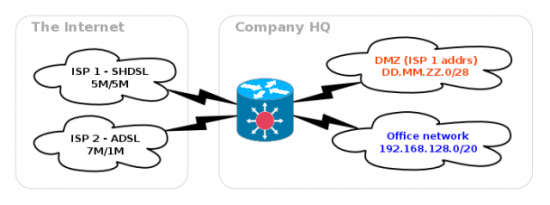
However, SHDSL is expensive! Although national traffic is free of charge, international traffic is $5/GB. Compare that with ADSL at $1/GB for both national and international (Table 1).
Table 1. ADSL vs. SHDSL| ADSL | SHDSL | |
|---|---|---|
| Speed | 7M down/1M up | 5M down/5M up |
| Price national | $1/GB | Free |
| Price international | $1/GB | $5/GB |
| Public IP addresses | 1 | 1 + /28 |
There are clear pros and cons to both. That made me think (and I don't do that often), what if we kept ADSL for international traffic that's not that critical for us, and use SHDSL primarily for national traffic—fast and cheap?

Figure 2. Split Traffic between International and National
We also got a /28 subnet with the SHDSL to use for a DMZ, and obviously, we want all the traffic to and from the DMZ to go via the SHDSL link, regardless of whether it's national or international.

Figure 3. Traffic to/from the DMZ
Routing 101
For my plan to work, the company core router needs some way to tell whether a packet from a workstation in the office to an IP.AD.DR.ES in the wild open Internet is international or national and send it accordingly through ADSL or SHDSL. Routers use their routing tables for deciding the fates and paths of the packets they forward. A simple routing table for an office workstation with an address of 192.168.130.100 may look like this:
[workstation] ~ # ip route show
192.168.130.0/24 dev eth0 proto kernel  scope link
 ↪src 192.168.130.100
default via 192.168.130.1 dev eth0
This says that all traffic to all other addresses in the 192.168.130.0/24 range is to be sent straight to the local network segment attached to interface eth0. All other traffic follows the "default" route and is handed over to the router with IP 192.168.130.1 to handle it. Let's assume we're sending a packet to 8.8.4.4, Google's public DNS server. For starters, we're trying to "ping 8.8.4.4" and are observing the traffic on the workstation's eth0 interface with tcpdump:
[workstation] ~ # tcpdump -i eth0 -n -s0 -e
listening on eth0, link-type EN10MB (Ethernet),
 ↪capture size 65535 bytes
[1] 17:53:59.615650 00:16:17:ec:5c:6c > ff:ff:ff:ff:ff:ff,
 ↪ethertype ARP (0x0806), length 42:
        Request who-has 192.168.130.1 tell 192.168.130.100,
        ↪length 28
[2] 17:53:59.615775 00:14:c2:5b:4f:2c > 00:16:17:ec:5c:6c,
 ↪ethertype ARP (0x0806), length 60:
        Reply 192.168.130.1 is-at 00:14:c2:5b:4f:2c, length 46
[3] 17:53:59.615796 00:16:17:ec:5c:6c > 00:14:c2:5b:4f:2c,
 ↪ethertype IPv4 (0x0800), length 98:
        192.168.130.100 > 8.8.4.4: ICMP echo request,
        ↪id 3082, seq 1, length 64
My workstation consulted the routing table for the destination IP 8.8.4.4 and realized it should send the packet to the default router 192.168.130.1. For that, it needs the router's low-level Ethernet address (also known as a MAC address), and the first packet in the above tcpdump output, marked [1], is doing exactly that—asking for the MAC address of IP 192.168.130.1 by "broadcasting" the request to all nodes on the network segment. The second packet, marked [2], is a reply—IP 192.168.130.1 is at MAC address 00:14:c2:5b:4f:2c. Finally, the PING packet can be dispatched, with the destination IP 8.8.4.4 to the router's MAC address 00:14:c2:5b:4f:2c (see the line marked [3]).
All good, so now we can assume our router got the packet and will forward it further toward the destination. Let's see what happens on the router.
We've got both the ADSL and the SHDSL links configured, but all traffic is, by default, sent through ADSL. The ADSL modem is at 192.168.128.254. For now, the SHDSL link 203.0.113.36/30 sits idle. Here is the routing table:
[router] ~ # ip route show
[1] 203.0.113.36/30 dev vlan-shdsl  proto kernel
 ↪scope link  src 203.0.113.38
[2] 192.168.128.0/24 dev vlan-adsl  proto kernel
 ↪scope link  src 192.168.128.1
[3] 192.168.130.0/24 dev vlan-office  proto kernel
 ↪scope link  src 192.168.130.1
[4] default via 192.168.128.254 dev vlan-adsl
The first line [1] is the SHDSL link—our router's IP on that link is 203.0.113.38. The second line is the link to the ADSL modem; the third line [3] is the network segment with my workstation, and finally, the fourth line [4] is the default route. All packets that don't match any of the local subnets on lines 1, 2 or 3 are sent down to the ADSL modem at 192.168.128.254 that then will forward them to the ISP 2. That's also the fate of our packet to 8.8.4.4. Let's quickly verify what is going to happen to it by calling
ip route get:
[router] ~ # ip route get 8.8.4.4 from 192.168.130.100
 ↪iif vlan-office
8.8.4.4 from 192.168.130.100 via 192.168.128.254 dev vlan-adsl
As you can see, it will be sent "via 192.168.128.254", which is the ADSL modem. A simple way to check the full network path from my workstation to any given destination address is the traceroute command. It shows all the routers ("hops") along the way to the destination:
[workstation] ~ $ /usr/sbin/traceroute 8.8.4.4
traceroute to 8.8.4.4 (8.8.4.4), 30 hops max,
 ↪40 byte packets using UDP
 1  gw-vlan-office.e-it.co.nz (192.168.130.1)
    ↪0.156 ms  0.126 ms  0.124 ms
 2  gw-vlan-adsl.e-it.co.nz (192.168.128.254)
    ↪0.853 ms  0.831 ms  0.830 ms
 3  core-adsl.isp2 (218.101.x.y)
    ↪11.765 ms  19.173 ms  19.066 ms
 4  core-xyz.isp2 (203.98.x.y)
    ↪16.052 ms  15.515 ms  17.153 ms
[... some more hops ...]
13  64.233.x.y (64.233.x.y)  193.826 ms  194.230 ms  194.412 ms
14  * * *
15  google-public-dns-b.google.com (8.8.4.4)
    ↪196.086 ms  195.909 ms  195.816 ms
As you can see, the first hop is our router 192.168.130.1. The second hop is the ADSL modem 192.168.128.254. The third hop is one of the ISP2's core routers, and so on and on, passing 11 more routers before the packet finally reaches the destination 8.8.4.4, aka google-public-dns-b.google.com.
Source : LinuxJournal

Researchers in America say they have created a wireless communication system that allows devices to communicate with each other without relying on batteries or wires for power and could play a vital role in the Internet of Things.
The communication technique—dubbed "ambient backscatter" by the University of Washington scientists—allows devices to communicate with each other by reflecting or absorbing preexisting radio signals from TV and mobile transmissions.
The energy-saving breakthrough could be particularly well suited to a home-based Internet of Things scenariowhere devices are usually within a few meters of each other.
The team has built small, battery-free devices with antennas that can detect, harness, and reflect a TV signal, which is then picked up by other similar devices.
"We can repurpose wireless signals that are already around us into both a source of power and a communication medium," said lead researcher Shyam Gollakota, a University of Washington assistant professor of computer science and engineering. "It's hopefully going to have applications in a number of areas including wearable computing, smart homes and self-sustaining sensor networks."
The researchers published their results at the Association for Computing Machinery's Special Interest Group on Data Communication 2013 conference in Hong Kong, taking place in Hong Kong recently. They received the conference's best paper award for their research.
"Our devices form a network out of thin air," said co-author Joshua Smith, a UW associate professor of computer science and engineering. "You can reflect these signals slightly to create a Morse code of communication between battery-free devices."
Strategically placed sensors support network
According to the university, smart sensors could be built and placed permanently inside nearly any structure, then set to communicate with each other. It is claimed that the sensors could be placed in a bridge to monitor the health of the concrete and steel, then send an alert if one of the sensors picks up a hairline crack. The technology can also be used for communication—text messages and emails, for example—in wearable devices.
Source : PCWorld
Subscribe to:
Posts (Atom)


Recent Comments