We have covered two methods here. The first method guides you if you have just deleted the bookmark accidentally and would like to undo the changes right away. The trick works only if it finds the browser has not been closed and reopened. The second method covers somewhat you may call as a delayed response i.e. only after you find an important bookmark missing from the list, you realize you have deleted something worthwhile and would like to undo the mistake.
Method 1
Hover the mouse cursor over ‘Display Bookmarks’ option in the upper right-hand corner of your computer screen. Click the option.

Library window opens on up. Select the ‘Organize’ section. Under it, choose ‘Undo’ option. This will undo the deletion.
Method 2
Firefox by default, creates a backup for your bookmarks. All you have to do is restore bookmarks from the auto-saved backup. Here’s how to do it!
Follow step 1 of method 1 and then, select “Show all Bookmarks” option.

Next, click “Import and backup” menu and hover upon “Restore” to select the date from the “Organize” menu to which the bookmark is to be restored.

At long last, Mozilla has rolled out a massive UI update to Firefox that makes it look almost exactly like Chrome. Dubbed Australis, this is the biggest ever change to Firefox’s user interface, with much improved streamlining and customization, and the unification of Mozilla’s design language across the desktop, smartphone, and Firefox’s myriad other form factors. Australis will debut in Firefox 28, which just hit the Nightly (alpha testing) channel; if everything goes to plan, the new-look Firefox should be ready for mass consumption at the start of 2014.
As you can see in the screenshots above and below — or if you download a Nightly build for Windows, OS X, or Linux — Firefox’s new Australis theme is very curvy. The most significant changes over the current desktop version of Firefox are: Lots of rounded corners, inactive tabs that “fade” into the background, less padding above tabs, and a massively re-worked main menu button (which shares the same icon as Chrome). Australis also introduces a brand new way of customizing the layout of Firefox — if you hit Customize in the new menu, a new tab opens that lets you rearrange every UI element to your heart’s conten.
Source : ExtremeTech

Via: PCWorld

While the word “smartphone” usually evokes images of pricey iPhones and Android handsets, plenty of inexpensive smartphones are also hitting the market—ripe for the millions of cell phone owners who want a smartphone, but can’t (or don’t want to) pay hundreds of dollars for one.
For Mozilla, which makes the popular Firefox Web browser, this looks like the most promising target market for its recently released Firefox OS, an open-source, largely Web-based mobile operating system intended to run on lower-cost smartphones. The first phones running the OS began selling this summer in several markets around the world.
The company is taking on an audacious challenge, going up against established operating systems like Google’s Android, as well as a slew of less well-known mobile operating systems. And if it wants to succeed, Mozilla has to ensure that those making Firefox OS-running phones—which include ZTE and LG—build products that consumers actually want to use, regardless of how much less they cost than many others on the market.
Curious to see how Mozilla’s efforts are playing out, I decided to check out one of these phones just after the release of a significant update to the Firefox OS this month: the ZTE Open ($80, unlocked, and available in the U.S. on eBay), which the Chinese smartphone maker undoubtedly sees as a way to grow sales by offering an inexpensive handset that uses an alternative OS. I tried to test it while keeping in mind how I might feel if this were not only my first smartphone, but also my first computer, which will undoubtedly be the case for some buyers.
My initial verdict? The Firefox OS is off to a good start, and for $80, the ZTE Open is an okay handset. With many improvements over time—some of which will presumably come from the developer community, which Mozilla hopes will build a slew of Web-based apps for the platform—the OS and smartphones like the ZTE Open could be an excellent choice for those who want basic smartphone capabilities but are not going to pay for a high-end handset.
The handset’s price tag is quite lower than some similar devices. Buying the ZTE Open through Telefonica’s Movistar in Spain, for example, cost 49 euros (about $68) when I last checked; you’d have to pay more than twice that—116 euros, or about $160—for the next cheapest available prepaid smartphone, a Sony Xperia E that runs Android and has similar specifications. Through Movistar in Venezuela, the device costs 149,900 Colombian pesos prepaid (about $80), while a Samsung Galaxy Young Android smartphone costs 297,000 Colombian pesos prepaid (about $158).
That low price shows in various ways. The first thing you may notice is that the ZTE Open could use some help in the fashion department. It looks a lot more like a smartphone from a couple of years ago than the hottest new handset. It’s squat and chunky, with a soft-feeling plastic back and display frame in pearly Firefox orange (that said, it feels good and solid in your hand, and I wasn’t afraid it would break if I dropped it). Its face is dominated by a touch screen that measures 3.5 inches at the diagonal, with a capacitive “home” button centered below it.
The Firefox OS is extremely intuitive and easy to find your way around, clearly taking many cues from iOS and Android. When you unlock the phone, you see a row of rounded app icons at the bottom of the screen for easy access to top functions (such as making calls, sending messages, and opening the Firefox Web browser—you can change these to suit your habits). There’s a swipe-down notification screen that also gives easy access to wireless and other device settings, and a Marketplace app that allows you to download Web apps (apps built using Web technologies like HTML5) from some big names including Facebook, Twitter, and YouTube.
Perhaps the most interesting thing about the Firefox OS is the way it tries to blur the divide between native and Web software. Atop the phone’s main home screen is a handy search bar; whatever you type in there will bring up results both on and off the phone. Search for “dinner,” for example, and you’ll get a list of round icons corresponding with dinner-related apps already installed on your device, as well as recipe- and dining-related websites shown as though they, too, were apps. Click on a result, such as Yelp, and it will automatically search for restaurants serving dinner near you. You can add this specific Yelp search to your home screen for future easy access. This is a clever way around the problem of a lack of apps (there is no Firefox OS app), but you’re really just adding a link to the Yelp mobile site to your phone in the form of a rounded icon. The fact that apps are built using Web technologies—such as HTML, CSS, and JavaScript—may also entice Web developers to build their first mobile apps.
There are a number of apps included on the handset, such as Nokia’s Here Maps, Facebook, and AccuWeather. And while some, like Here Maps, felt like self-contained app experiences, others (like the New York Times app) looked more like mobile websites. There also didn’t seem to be any notifications for any of the apps I had on the phone (there was an option in the phone’s settings to show notifications on the phone’s lock screen, which I enabled, so presumably Mozilla is still working on that).
The handset hardware is very low, but not entirely no-frills, with a three-megapixel rear camera, rear speaker, and Bluetooth, as well as the ability to function as a Wi-Fi hotspot. There’s hardly any storage space on the phone itself; if you want to take and use photos, videos, and music, you’ll need to pop in a microSD memory card.One of the phone’s biggest issues seems to be its speed (or lack thereof), which is limited in part by its processor and memory (a one-gigahertz Qualcomm CPU and 256 megabytes of RAM—the same as the Galaxy Young but a measly amount compared to the latest iPhones and high-end Android handsets) and wireless network capabilities (2G and 3G, not LTE). In the U.S., you’ll need to use it with either T-Mobile’s or AT&T’s network; I tested it on T-Mobile’s network and found it somewhat pokey, especially when loading media-heavy Web pages, but generally okay. This is expected, given the low price, but I’m hopeful that improvements to the OS can help in the near term. In fact, I already noticed a bit of a speed difference between using a phone running the most recent Firefox OS and the last version, which is a good sign.
I also had problems with its touch capabilities, which often seemed unwilling to do what I wanted. Tapping app icons and virtual buttons often took several tries, as did tapping a field to enter text (such as a username and password or a URL). Numerous times I swiped right or left to move between the phone’s virtual home screens without seeing a change, or thought I was tapping one button and somehow hit another, which was annoying. It’s irritating, but hopefully the abundance of touch screens in mobile devices and improvements in the technology will soon make it affordable to add better touch screens to low-end phones, too.
Source : MIT Technology Review

Last week, Firefox was released for all Linux Ubuntu versions. Other Linux users can download the new release from Mozilla.
Firefox 24 features
Firefox 24's security updates and protection from malware may lure some Linux users back to Mozilla. Ten critical vulnerabilities are addressed in Firefox 24, including memory management errors that leave the system vulnerable to malicious code. The updated browser also features improved debugging, improved page loading and a "close tabs to the right" feature. Security patches will also improve browser performance to hopefully minimize some of the crashing longtime Firefox users have come to know — crashing that can leave the browser vulnerable to hackers.The latest version also removed support for certificate revocation lists (CRLs), an outmoded form of authorizing SSLs that are not supported by mobile versions of Firefox or Google Chrome. Additionally, Firefox 24 contains a number of improvements for Thunderbird, the free open source email client from Mozilla.
Implications for security
The latest update spells good news for Firefox users: The security patches limit the installation of malware or malicious code. Prior to these patches, a hacker could install malware on a Linux machine, and the malware could then be triggered by nothing more than normal Firefox browsing. High threats allow hackers to gather sensitive data from websites on a user's computer or to inject code into websites that would then be used to harm others' computers.Mozilla maintains a Security Advisories for Firefox webpage where users can track different bugs by critical, high, moderate or low severity level. Seventeen different security advisories were fixed in Firefox 24.
Linux system requirements
Mozilla imposes the following system requirements for Linux users. Linux distribution platforms may offer other versions of Firefox 24 that come with different system requirements. At minimum, Linux users need the following core element for Firefox 24 to run:- GTK+ 2.18 or higher
- GLib 2.22 or higher
- Pango 1.14 or higher
- X.Org 1.0 or higher
- libstdc++ 4.3 or higher
For enhanced performance, Mozilla recommends that users also have at least NetworkManager 0.7, DBus 1.0, HAL 0.5.8 and GNOME 2.16 installed.
Source : Noobslab

Officially unveiled by Mozilla on September 17, 2013, the Mozilla Thunderbird 24 email and newsgroup client introduces the ability to watch or ignore message threads, the ability to send emails to IDN based email addresses, various Chat fixes, better support for Twitter, IRC improvements, and various security fixes.
All Ubuntu 13.04 (Raring Ringtail), Ubuntu 12.10 (Quantal Quetzal), and Ubuntu 12.04 LTS (Precise Pangolin) users can update their Thunderbird email client to version 24.0 right now, using the Update Manager software.
Other Linux users can download Mozilla Thunderbird 24.0 for Linux binaries and sources right now from Softpedia. Also, don't forget to visit our always up-to-date Thunderbird Extensions section for the latest add-ons!
Source : Softpedia

The open-source browser effort is aimed at fixing flaws and improving security in upcoming releases of Firefox.
Providing a preview of what's to come, Mozilla developers are now out with development versions of the next two releases of the open-source Firefox Web browser."This new feature adds the ability to preserve your open tabs and windows as well, so that you don't need to reopen them after resetting," Nightingale explained.
Firefox 26
"In the months since we first discussed our intent to do this, our designers and user researchers have been hard at work ensuring that this improved performance and security doesn't harm Firefox's ease of use," Nightingale said.
Source : eWeek
There was a period where it appeared that the smartphone industry would be dominated by closed products and non-free software. Android has done a lot to change that situation; it is now possible to own a hackable device that runs mostly free software. But it would be nice to have some viable alternatives, preferably even more free and more Linux-like. Among the many would-be contenders for the title of leading alternative, Firefox OS offers a special appeal. It is, after all, a Linux-based system built by an organization that has a history of looking out for the interests of its users. So when the opportunity came along to try out Firefox OS on real hardware, your editor did not hesitate for long.
![[installable apps]](http://lwn.net/images/2013/zte/installable-sm.png) The Firefox OS interface has not changed a great deal since this review was written at the end of last year. The annoying three-step process (hit the power button, swipe upward, tap the "unlock" icon) to unlock the screen is still necessary. Swiping toward the left on the home screen yields a list of installed applications, while swiping to the right yields a list of installable application categories. Strangely, many of the categories are not initially visible on that screen. Instead, one must hit the "more" button to see the full list of categories; only thereafter is it possible to see which applications can be found therein. There is a reasonably long list of available applications, but relatively few that would be familiar to iOS or Android users.
The Firefox OS interface has not changed a great deal since this review was written at the end of last year. The annoying three-step process (hit the power button, swipe upward, tap the "unlock" icon) to unlock the screen is still necessary. Swiping toward the left on the home screen yields a list of installed applications, while swiping to the right yields a list of installable application categories. Strangely, many of the categories are not initially visible on that screen. Instead, one must hit the "more" button to see the full list of categories; only thereafter is it possible to see which applications can be found therein. There is a reasonably long list of available applications, but relatively few that would be familiar to iOS or Android users.
![[maps]](http://lwn.net/images/2013/zte/map-sm.png) There is a basic email client that, unfortunately, could not be tested, since it refuses to deal with mail servers that have self-signed certificates. The web browser is Firefox, of course; it works as expected. There is a basic mapping tool (using "HERE") that can generate driving directions; there is no turn-by-turn navigation available, though. As an added "benefit," the maps include location-based advertisements. Weather information is available through an Accuweather app; there is also a basic calendaring tool. The contact manager can import data from Facebook, but not from other sources (Google, for example).
There is a basic email client that, unfortunately, could not be tested, since it refuses to deal with mail servers that have self-signed certificates. The web browser is Firefox, of course; it works as expected. There is a basic mapping tool (using "HERE") that can generate driving directions; there is no turn-by-turn navigation available, though. As an added "benefit," the maps include location-based advertisements. Weather information is available through an Accuweather app; there is also a basic calendaring tool. The contact manager can import data from Facebook, but not from other sources (Google, for example).
![[running apps]](http://lwn.net/images/2013/zte/running-sm.png) The home button will, if held down, produce a scrollable screen showing the currently running applications. The user can then switch to one of those applications; there is an option to close running applications as well. This screen is supposed to show a thumbnail with the current screen contents of each app, but those thumbnails are often blank for some reason.
The home button will, if held down, produce a scrollable screen showing the currently running applications. The user can then switch to one of those applications; there is an option to close running applications as well. This screen is supposed to show a thumbnail with the current screen contents of each app, but those thumbnails are often blank for some reason.
The ZTE Open
The device in question is the ZTE Open, a Firefox OS handset that can be had for a mere $80. That is a low price for a smartphone, but it is consistent with Mozilla's apparent strategy of targeting the cheaper end of the market. Cheap is nice, but, as one might expect, some severe compromises had to be made to arrive at that price. The phone uses an oldish Qualcomm MSM7225A processor with only 256MB of memory. The camera offers a two-megapixel sensor, which is low by contemporary standards. Internal storage is minimal, but the phone comes with a 4GB MicroSD card.
Visually, the device is smaller than many current devices. It is also bright orange; it looks a lot like a Nexus One that has been outfitted for hunting season. The 480x320 HVGA screen is decidedly low-resolution by current standards. As one might expect, the device is often slow to respond, especially when switching between applications. Perhaps most annoying, though, is that the touchscreen itself is often unresponsive. Using the Firefox OS on-screen keyboard can be a slow and painful experience.
The Firefox OS interface has not changed a great deal since this review was written at the end of last year. The annoying three-step process (hit the power button, swipe upward, tap the "unlock" icon) to unlock the screen is still necessary. Swiping toward the left on the home screen yields a list of installed applications, while swiping to the right yields a list of installable application categories. Strangely, many of the categories are not initially visible on that screen. Instead, one must hit the "more" button to see the full list of categories; only thereafter is it possible to see which applications can be found therein. There is a reasonably long list of available applications, but relatively few that would be familiar to iOS or Android users.
Application installation is a matter of holding a finger down on the relevant icon. Since applications are all web-based, though, there is no real need to install them unless one wants to run one offline or have the icon in a handy place. There is a permissions model for applications, but that is all hidden from the user; for the most part, users are supposed to rely on the maintainers of the application "marketplace" to ensure that malicious applications are not made available. The one exception is for location data; the system will ask the user before allowing an application to access the user's current location.
There is a basic email client that, unfortunately, could not be tested, since it refuses to deal with mail servers that have self-signed certificates. The web browser is Firefox, of course; it works as expected. There is a basic mapping tool (using "HERE") that can generate driving directions; there is no turn-by-turn navigation available, though. As an added "benefit," the maps include location-based advertisements. Weather information is available through an Accuweather app; there is also a basic calendaring tool. The contact manager can import data from Facebook, but not from other sources (Google, for example).
At the interface level, one of the most striking decisions is the complete absence of a "back" button. The result is that one often seems to end up in some application-specific dead end, with no recourse other than to hit the "home" button and drop out entirely. Getting rid of "back" may make application development easier, but the result seems to be less friendly for the user.
The home button will, if held down, produce a scrollable screen showing the currently running applications. The user can then switch to one of those applications; there is an option to close running applications as well. This screen is supposed to show a thumbnail with the current screen contents of each app, but those thumbnails are often blank for some reason.
All told, the ZTE Open is reminiscent in many ways of the first Android phones. It is slow, somewhat buggy, and the functionality is not up to what the market leaders provide. Whether Firefox OS will yet turn out to be a disruptive technology like Android was remains to be seen.
Under the hood
One does not need to look too hard at Firefox OS to realize that its developers have taken advantage of a lot of free infrastructure from Android. The kernel on the ZTE Open is an Android-derived, bleeding-edge 3.0.8 model, with wakelocks and all. Services like binder are running. The Android USB debugging protocol is supported, so tools like adb and fastboot can be used in the usual manner (though there is an update that should be applied for fastboot use). Much of the graphics subsystem is built on the Android "gralloc" API as well. All told, Firefox OS has benefited strongly from the availability of the Android code as a base to build on.
There appears to be no available terminal emulator application for Firefox OS. But one can, naturally, get a shell on the device by plugging it into a USB port and running adb shell. The shell environment is based on BusyBox and is rudimentary — but not worse than what one encounters on an Android device. It is also an unprivileged shell; there does not appear to be any way to gain root access short of exploiting a vulnerability — or installing a new version of the operating system.
In the limited time available your editor was unable to succeed in the latter task — replacing the operating system. There is extensive documentation on how this should be done on the Mozilla web site, and it is a simple matter of patience to download the 12GB "source" tree ("source" being in quotes because it includes things like a binary cross compiler, video files, and more). The actual build process requires that the phone be connected so that a number of binary files can be copied off of it; these (proprietary) files are needed to build a replacement image. Thereafter the build fails (in an equal manner on Ubuntu, Debian, and Fedora boxes) after a long list of warnings. Somewhat discouraging.
Perhaps this particular problem is a temporary setback resulting from the state of the source tree when this build was attempted. But it's clear that, like building Android, making a new Firefox OS image is not a task for the faint of heart. Should this system take off, future users are far more likely to exercise their freedoms once a CyanogenMod-like project comes along to take care of a lot of the details.
Conclusion
But will Firefox OS take off? It is hard to see the system, as demonstrated by the ZTE Open, displacing Android anytime soon. It is too slow, too rough-edged, and lacking too many third-party applications. Most people with access to a recent Android-based handset are likely to stick with that rather than shift over to Firefox OS.
But the world is full of people without access to such a handset. Mozilla seems to be making a play for the attention of many of those people by going after the low end of the market. After all, $80 will not buy a particularly satisfying Android device either; it is hard to imagine Android running on hardware like the ZTE Open in any kind of pleasing way. Perhaps Firefox OS will find a place running on low-end devices; by the time the system matures (and it does appear to be developing quickly), there might just be an established user base for it.
Working with this device reminded your editor of a scene from Charlie Stross's classic Accelerando:
Amber clutches the phone like a lifesaver: It's a cheap disposable cereal-packet item, and the cardboard is already softening in her sweaty grip.
If we can envision an era where cardboard telephones can be obtained from a box of cereal, it is not much of a stretch to think about those phones running a relatively undemanding system like Firefox OS.
Meanwhile, though, Firefox OS hopes for a place on the plastic devices that we use now. Anybody wanting to experiment with the system can build it for a number of current devices, including most recent "Nexus" phones. If enough developers do that and start taking the system in interesting directions, if more applications appear, and if people actually buy Firefox OS devices, it may well develop to a point where it is a realistic competitor to the more established mobile operating systems. Another free Linux-based mobile system would be a good thing, so one can only wish Mozilla luck as it pursues that goal.
Source: lwn

With this, you can now make use of web apps that play nice with WebRTC in order to make video calls from a handset to a desktop or notebook, and alternatively, from Firefox to Chrome. As for Firefox 24 for Android, some of the changes include the ability to share open tabs between mobile devices using NFC, a night mode that paves the way for a better reading experience in Reader, a Quick Share pop-up that will appear with icons for your most frequently used sharing methods, among others. Have you given Firefox 24 a go already, and how do you find it so far?
Source : Ubergizmo

Firefox is to remain the default browser in Ubuntu 13.10, Ubuntu developers have today confirmed.
Chromium, the open-source frills-free version of Google Chrome, was put forward as a Firefox replacement for the 13.10 release back in May. The debate on which was better suited continued into June. At that time developers said they were ‘leaning towards Chromium as default’.
But, in an e-mail to the Ubuntu Developer list today, Jason Warner, Ubuntu Desktop Manager at Canonical, has said that Firefox will remain the default for 13.10.
Chromium will remain available to install from the Ubuntu Software Centre in Ubuntu.
We ran a poll around the time of the original proposal asking readers which browser they’d prefer to see installed by default. It was a close-run thing; Firefox pipped Chromium to the post1 with over 56% of nearly 10,000 votes.
‘Historic Pattern of Updates’
This decision seems to have been was based around ‘historic pattern of updates around Chromium‘ and issues related to ‘keeping up with Chromium changes’ that affect.
But it seems that Warner doesn’t consider any of these set-backs insurmountable in the near-term:
I do want to consider Chromium by default for 14.04 once the above is no longer an issue. I sincerely believe Chromium is the better experience for general users and should be strongly considered for our next LTS.
The debate over the default browser may be over for this cycle but it’s set to continue well into the next.
Source : OmgUbuntu

When I reviewed Mozilla’s Firefox last summer, it had gained more in version numbers than in notable features. With version 23, the open-source browser amasses a few long-awaited additions that bring it up to par with other browsers. Unfortunately, it still performs on the low to mediocre end of its peer group, and many of its features tend to crowd out and overlap one another.
Would you like a kitchen sink with that?
Over the years, Mozilla has added smart, well-executed features to Firefox. But it has hesitated to subtract older ones, which means the new stuff butts up against previous elements in an increasingly cluttered interface.
Want to search the Web? Use the universal search/URL bar—or the dedicated search box immediately next to it. Want to browse your bookmarks? Use the nifty slide-out bookmarks window on the left side of the screen. Or the pop-out bookmarks menu on the right side of the screen. Or the bookmarks bar running along the top of the window. Or the Bookmarks menu above it…you get the idea.
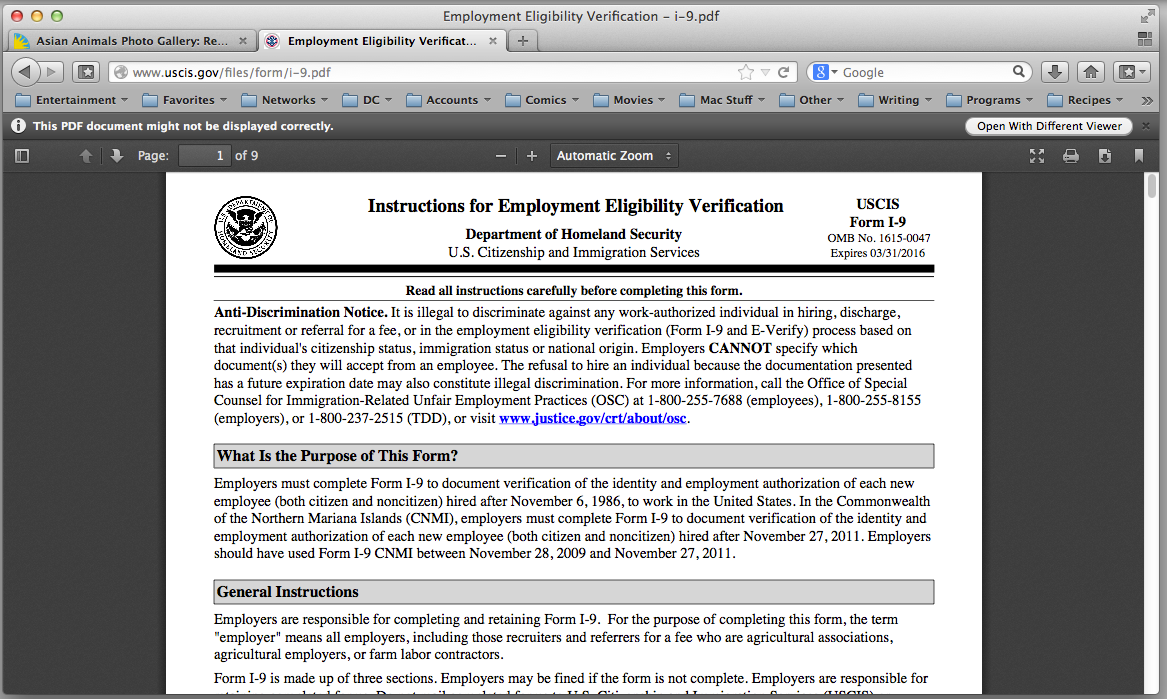
Happily, the major additions between last year’s version 14 and this year’s version 23 are more overdue than redundant. At last, the browser can display PDF files inline without plug-ins; previous versions still needed to open them in an external app.
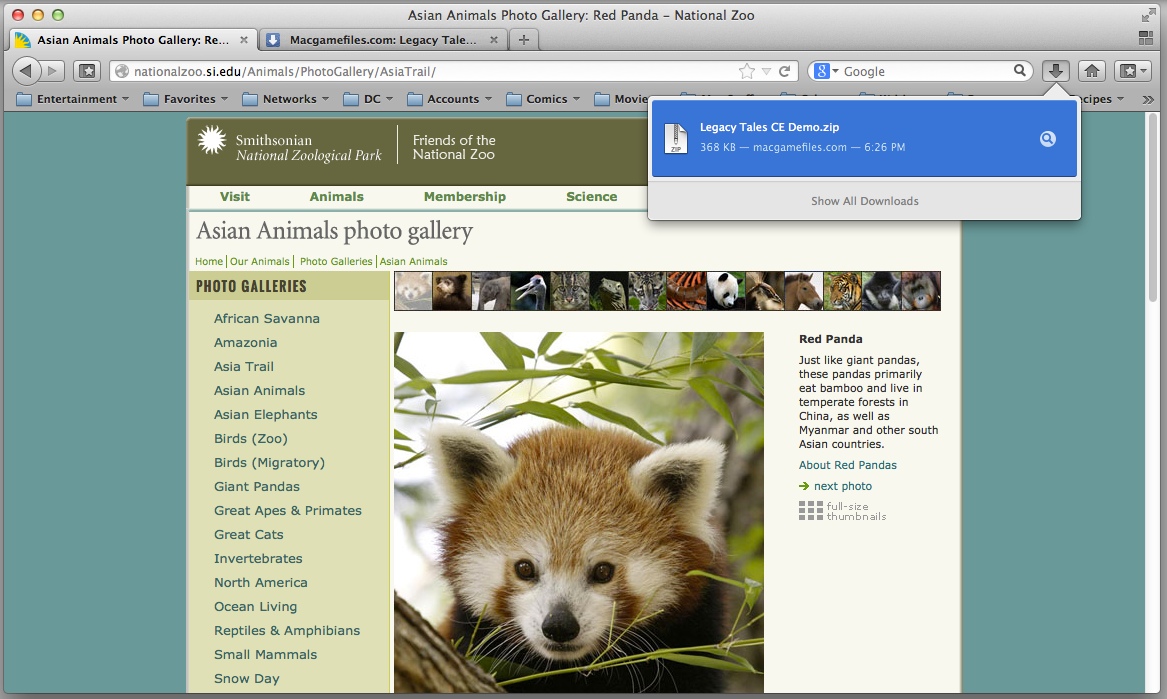
And instead of appearing in an annoying separate window, the download function borrows Safari’s approach, providing a pop-down window that lists any files currently transferring. In one of Firefox’s typically cool, off-kilter touches, small but readable numbers in the download button count down the seconds until the file fully arrives.
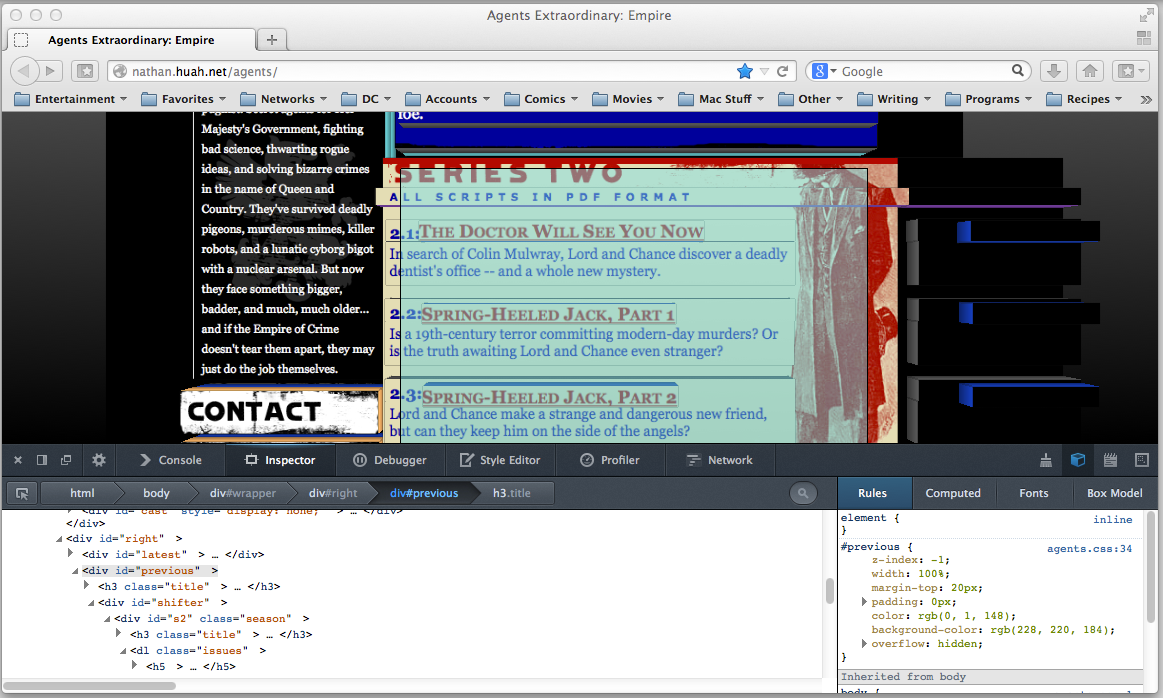
Firefox’s developer tools remain the niftiest in browserdom, offering the same code-scrutinizing capabilities as Safari and Chrome, but in a much sleeker, eye-catching package. I especially like its 3D view; the deeper each element on the page is nested, the more it protrudes toward you.
Better yet, Firefox 23 packs all of this power into a file size approximately 20 percent smaller than that of Firefox 14.
Firefox’s performance: More of a dull smolder
Although the browser never felt particularly sluggish in everyday use, Firefox 23 achieved only low or middling scores in all but one of my standard browser benchmarks. On a 2.9GHz Core i7 MacBook Pro with 8GB RAM, I tested Firefox’s newest version against those of Safari, Opera, and Chrome, along with last year’s Firefox 14. In several key areas, Firefox 23 has barely improved over its predecessor.
In HTML5 vector graphics, Firefox 23 posted a statistically insignificant lead over version 14. More important, however, it was significantly slower than the next closest browser, Opera (which was more than three times as fast as Firefox 23), and top dog Safari (roughly seven times as fast).
The gap between Firefox and its rivals wasn’t quite as pronounced in HTML5 bitmap graphics, but that’s not saying much. Though it scored just a hair faster than version 14, it was still only about half as fast as any other browser tested.
In HTML5 text rendering, Firefox 23 just barely outscored Opera, but ranked behind Safari and Chrome. Version 23 turned in a notably slower score here than version 14 did, too.
Firefox 23 did claim a surprise victory in the SunSpider JavaScript benchmark, though, running about 4 percent faster than second-place Chrome and Firefox 14, and a little more than 13 percent faster than last-place Safari.
It didn’t do as well in Google’s Octane JavaScript test, beating Safari by a comfortable margin but still placing a relatively distant third overall. Firefox 23 did, however, score nearly twice as well on this test as Firefox 14.
Those results repeated themselves when I tested Firefox 23’s HTML5 standards compliance. The browser thumped Safari, but lost out to Opera and Chrome. That said, it bested Firefox 14 by more than 60 points on the test’s 500-point scale.
Benchmarks: Firefox 23
Best results in bold. Reference browsers are in italics. HTML5 Vector, Bitmap, and Text test results are in frames per second; higher is better. The Octane JavaScript test results are scores; higher is better. The SunSpider JavaScriptresults are in milliseconds; shorter times are better. The Acid3 result is a score out of 100. The HTML5 Compliance result is a score out of 500.
Bottom line
I can’t ignore Firefox 23’s largely lackluster performance, or its crowded and increasingly clunky interface. But Mozilla and its developers show impressive attention to detail in each individual feature, and for all their excesses, it’s clear that they’re thinking hard about how people might use their browser. That’s more than I can say for Chrome, and it gives Firefox more personality (for good or ill) than the latest version of Opera.
source : Mac World
Subscribe to:
Posts (Atom)


Recent Comments